
Stopping a running unit just to change one interlock or add an I/O module can cost days of production. Modern control systems allow many changes with the controller in run, if engineers respect the rules and risks.
Continuous plants rarely get a shutdown window when a logic fix is urgent. Online changes save production, but a careless download can bump valves, reset values or upset a redundant pair.
What Is a DCS Online Download?
A DCS online download is the transfer of modified control configuration or hardware settings to a controller while it keeps running the process. It is the plant scale version of online editing described in PLC online and offline programming.
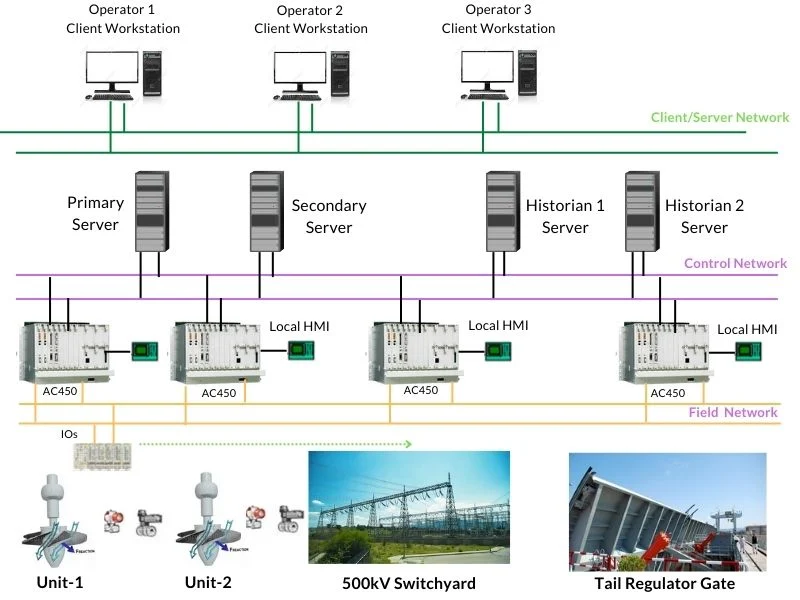
Engineers make the change on the engineering station, compile it and send it to the automation station, as explained in DCS components ES, OS and AS. The controller then switches to the new configuration at a defined point.
Emerson DeltaV, for example, supports editing control modules in Control Studio and downloading them to a running controller. Every major distributed control system offers some form of this feature, with its own limits.
Safe Online Changes vs Offline Changes
| Change Type | Usually Online | Notes |
|---|---|---|
| Tuning parameters | Yes | Lowest risk, still log it |
| Logic in one module | Yes | Check initial values |
| New control module | Yes | Test in simulation first |
| Adding PROFIBUS slaves | With CiR | Siemens S7 400 with CiR |
| Controller firmware | Often no | Redundant pairs may allow it |
| CPU or network type change | No | Needs a shutdown window |
Function block changes are the most common online task, see DCS function block programming. Always check which block parameters get reset to default when a block is recompiled.
How Siemens Configuration in Run Works
According to Industrial Monitor Direct, Siemens CiR lets engineers expand PROFIBUS DP hardware, such as adding slaves or modules, while the CPU stays in RUN. The CP 443 5 Extended module supports up to 125 slaves per channel, according to this source.
The Siemens CiR product brief notes that during CiR synchronisation the I/O is held at its last value. The interruption is short, but the process must tolerate frozen outputs for that moment.
Industrial Monitor Direct also states that, as of PCS 7 V9.0, there was no CiR equivalent for PROFINET IO, so the CPU had to stop for such changes, according to this source. Check the current Siemens manuals for your version, and see PROFIBUS vs PROFINET for protocol differences.
Fieldbus devices on PROFIBUS PA or Foundation Fieldbus add their own configuration rules, covered in DCS fieldbus integration.
Key DCS Online Download Risks
Redundant controllers usually load the standby first and then switch over, as described in DCS controller redundancy types. PLC systems use a similar approach, see PLC hot standby redundancy.
Until the standby is back in sync, the system has no redundancy. Plan the change so a controller fault during that time does not upset the plant.
7 Proven Steps for a Safe Download
Keep a clear rollback plan with the previous project version ready. Record every DCS online download in the change log with time, author and scope.
Download Window Formula
Example:
6 controllers, 4 min download, 3 min sync, 5 min verification each
Window = 6 × (4 + 3 + 5) = 6 × 12 = 72 min
Total window about 72 minutes, or 1.20 hours
Download controllers one at a time, not in parallel, so any problem stays limited to one area. Add a margin for unexpected alarms.
Download Window Planner
Use measured times from earlier downloads on the same system. Sync time grows with controller memory size.
- No production loss for many changes.
- Fast bug fixes and improvements.
- Hardware expansion with CiR.
- Less pressure on shutdown windows.
- Risk of output bumps and resets.
- Temporary loss of redundancy.
- Not every change is supported.
- Needs strict change control.
Older systems often have weaker online change support, one reason for upgrades discussed in DCS migration and obsolescence. I/O card changes also depend on card type, see DCS I/O card types.
Siemens CiR Product Brief PDF
Configuration in Run Video
DCS Online Download FAQ
Related Articles
- Distributed Control System
- DCS Controller Redundancy Types
- DCS Components ES, OS and AS
- PLC Online and Offline Programming
- PROFIBUS vs PROFINET
External References
- CiR Configuration in Run, Product Brief, Siemens
- Resolving PCS 7 Hardware Expansion with CiR, Industrial Monitor Direct
- Distributed Control System, Wikipedia
What We Learn Today
- A DCS online download changes configuration with the plant running.
- Siemens CiR adds PROFIBUS hardware while the CPU stays in RUN.
- Backups, MOC, simulation and verification keep changes safe.