The layout of your cables decides what one broken patch lead or dead switch will do to the process. We compare star, bus, ring, mesh, tree and line layouts with PROFIBUS, PROFINET and MRP numbers you can use on site.
Learn how star, bus, ring, mesh, tree and line layouts behave in PROFIBUS and PROFINET plants. You also get a link and cable calculator, a selection flowchart and a troubleshooting table.
What is network topology and which types are used in industrial plants?
Network topology is the way devices and cables are arranged and connected, and it decides which single fault can stop communication. Plants mainly use star (Ethernet with a central switch), bus (PROFIBUS DP with terminators at both ends), line (PROFINET daisy chain), ring (PROFINET with MRP, recovering in 200 ms) and mesh (wireless sensor networks). Example: 10 devices need 9 links in a line, 10 in a ring and 45 in a full mesh.
What Is Network Topology?
Network topology is the physical and logical arrangement of nodes and links, meaning which device is cabled to which and how data travels between them. In a plant it decides how much cable you pull, where the single point of failure sits and how fast the system recovers.
- PROFIBUS DP is a bus: 32 stations per RS485 segment, terminated at both ends.
- MRP rings recover in 500, 200 or 30 ms for up to 50 switches (IEC 62439 part 2).
- A full mesh of n nodes needs n × (n minus 1) ÷ 2 links.
- Copper Ethernet allows 100 m per link.
Wikipedia separates physical network topology (where the cables run) from logical topology (how frames move). Old Ethernet hubs, for example, were wired as a physical star but behaved as a logical bus.
The network topology choice sits next to the choice of protocol, covered in types of industrial communication protocols, and the physical layer: RS485, copper Ethernet or fibre.
The PROFINET Design Guideline from PI states that standard Ethernet does not allow rings. A ring only works with a redundancy protocol such as MRP.
Types of Network Topology in Industrial Networks
There are six layouts you will meet in plants: star, bus, ring, mesh, tree and line. Each one trades cable count against fault tolerance in a different way.
Every device has its own cable to one central switch.
All stations tap one shared trunk with a terminator at each end.
Each device has two ports and passes traffic on to the next one.
A line closed back to the first device, with one port blocked by a redundancy manager.
Several stars joined through linked switches, one star per plant area.
Nodes have several paths to each other, fully or partly meshed.
The PROFINET Design Guideline calls the tree typical for plants grouped into manufacturing islands, and the line the usual choice for conveyor belts. The drawing shows the three most common layouts.
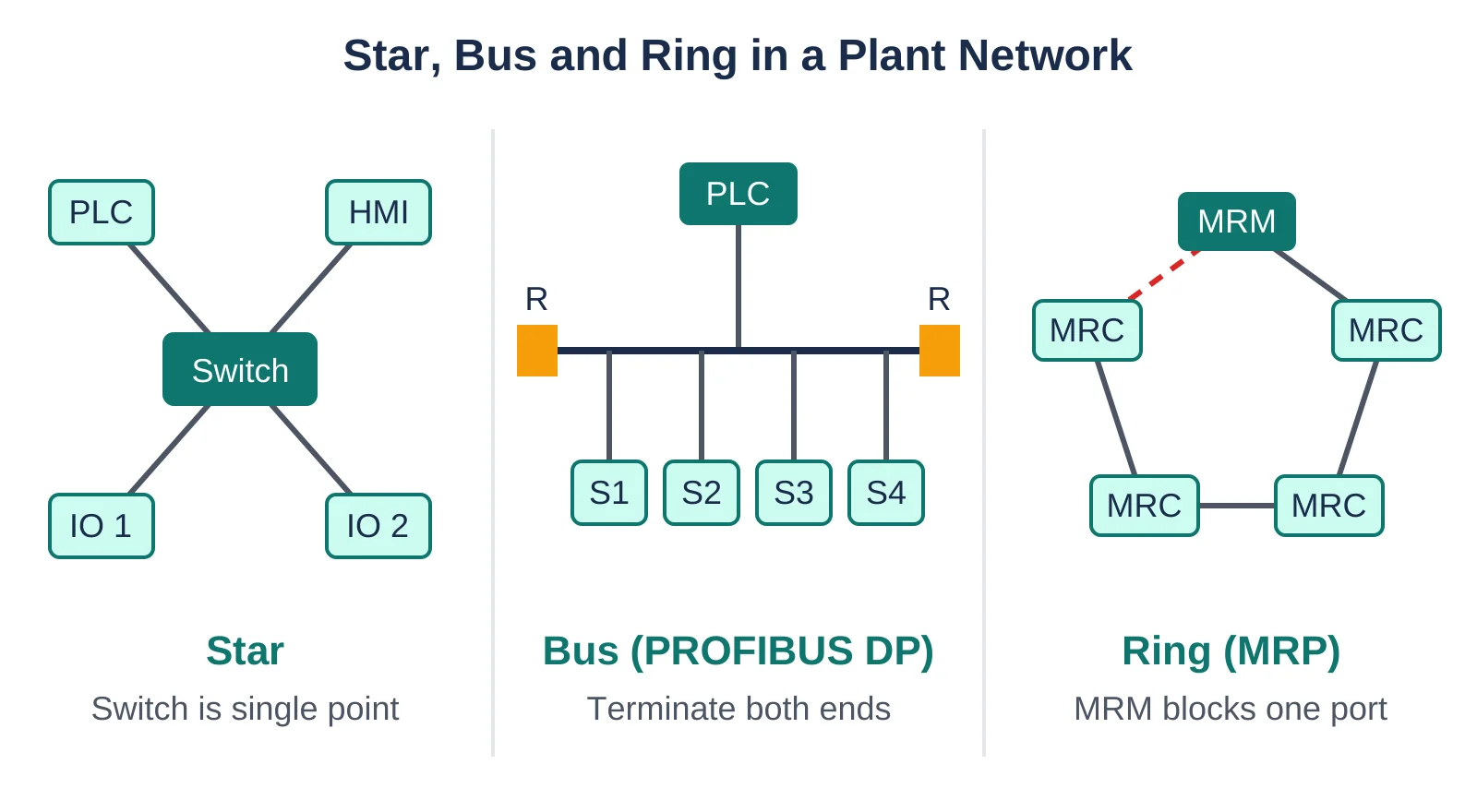
In the star network topology the weak point is the switch, and in the bus it is the trunk with its two terminators. In the ring the manager (MRM) keeps one port blocked as a standby path, and our guide to network switches for SCADA and DCS explains which managed switch features you need for each case.
How Do Star, Bus and Ring Work on PROFIBUS and PROFINET?
PROFIBUS DP runs as an RS485 bus, while PROFINET runs on switched Ethernet and can be wired as a star, line, tree or ring. The network topology you wire decides what happens when a cable fails.
| Layout | Plant example | Links for n nodes | Single point of failure | Fault recovery |
|---|---|---|---|---|
| Star | Ethernet panel with one switch | n | Central switch | None, swap the switch |
| Bus | PROFIBUS DP segment | One trunk plus drops | Trunk cable, terminators | None |
| Line | PROFINET daisy chain | n minus 1 | Every link in the chain | None |
| Ring | PROFINET with MRP | n | None for one fault | 500, 200 or 30 ms |
| Full mesh | Wireless sensor network, backbone | n × (n minus 1) ÷ 2 | None for one fault | Rerouting |
For a bus network topology, Beckhoff lists the EN 50170 PROFIBUS limits as 32 devices per segment without a repeater and 100 m per segment at 12 Mbit/s, rising to 1200 m at 93.75 kbit/s. The trunk needs terminating resistors at both ends, and stubs should not be used at 12 Mbit/s.
The RS485 physical layer behind this is covered in our RS232 vs RS485 comparison, and the protocol level differences are in PROFIBUS vs PROFINET. Modbus RTU is also a bus, while Modbus TCP moves to a switched star (see Modbus RTU vs Modbus TCP).
On a PROFIBUS bus, start with the terminator switches on the first and last connector. A terminator switched on mid trunk cuts off every station after it.
In an Ethernet network topology every copper link is a point to point cable of up to 100 m, so the limit applies per link. The Ethernet cable length and types guide lists the categories, and for longer runs between buildings an industrial fibre optic network is the usual answer.
Advantages and Disadvantages of Network Topology Types
Star and line layouts are cheap and simple but have no second path. Rings and meshes add one at the cost of extra cable and configuration.
- Star: one faulty device or cable does not disturb the others.
- Bus: least cable, one trunk and short drops.
- Line: no field switch needed.
- Ring: survives any single cable or device failure.
- Mesh: traffic reroutes around faults.
- Star: the central switch stops everything if it fails.
- Bus: a trunk break or wrong termination stops the segment.
- Line: one break cuts off every device behind it.
- Ring: needs MRP and has a recovery time.
- Mesh: link count grows with the square of the nodes.
A good plant network topology is usually a hybrid: a redundant ring or dual star at the control level and lines or stars at the field level, as described in DCS network redundancy with ring, star and dual networks.
How Fast Does an Industrial Ring Recover?
An MRP ring recovers within 500 ms, 200 ms or 30 ms for up to 50 switches, depending on the setting chosen under IEC 62439 part 2. Rings of up to 14 switches can reach a worst case of 10 ms.
In a ring network topology with MRP, one switch is the Media Redundancy Manager (MRM) and the rest are Media Redundancy Clients (MRC). The manager blocks one of its two ring ports and opens it when a failure occurs.
For zero recovery, IEC 62439 part 3 defines PRP and HSR, which send every frame over two paths at once. Classic spanning tree with default timers can take 30 to 50 s, and we compare these schemes in SCADA redundancy architecture.
How to Calculate Links and Cable for Each Layout
A line needs n minus 1 links, a star and a ring need n, and a full mesh needs n × (n minus 1) ÷ 2. Multiply by the average link length for cable.
Full mesh = n × (n minus 1) ÷ 2
= 10 × 9 ÷ 2 = 45 links = 2250 m
Ring = n = 10 links = 500 m
Star = n = 10 links = 500 m
Line = n minus 1 = 9 links = 450 m
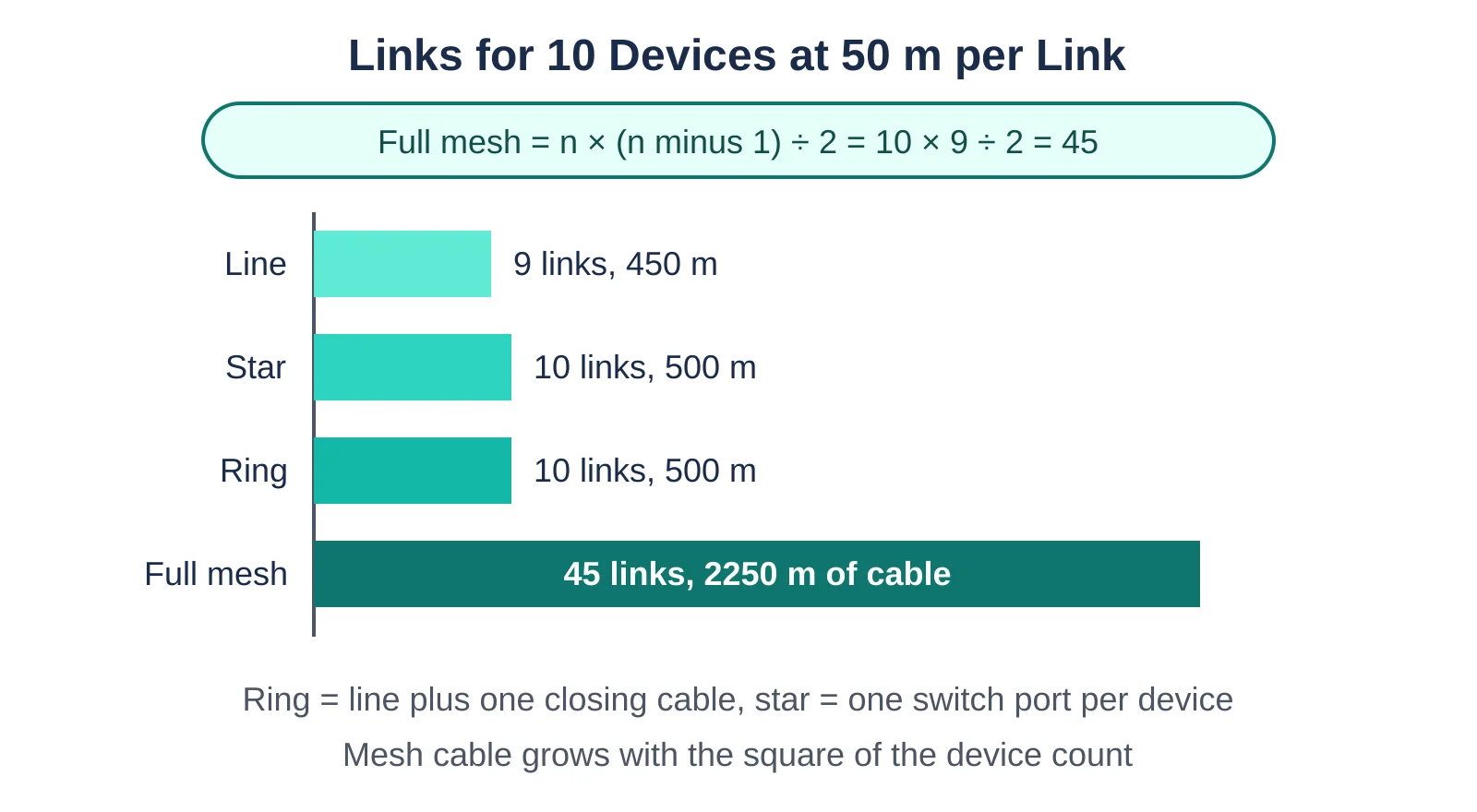
A ring network topology costs only one extra cable over the line. The full mesh needs 4.5 times the ring cable for the same 10 devices, and the gap widens with every node.
The star figure excludes uplinks between switches. For traffic loading, use our network bandwidth and throughput calculator.
Wikipedia notes that in a fully connected network the number of connections grows quadratically with the number of nodes, which makes it impractical for large networks.
Which Network Topology Is Best for an Industrial Plant?
Use a ring with MRP where one cable break must not stop the process, and a star or line where a short stop is acceptable. Pick PRP or HSR when even 200 ms is too long.
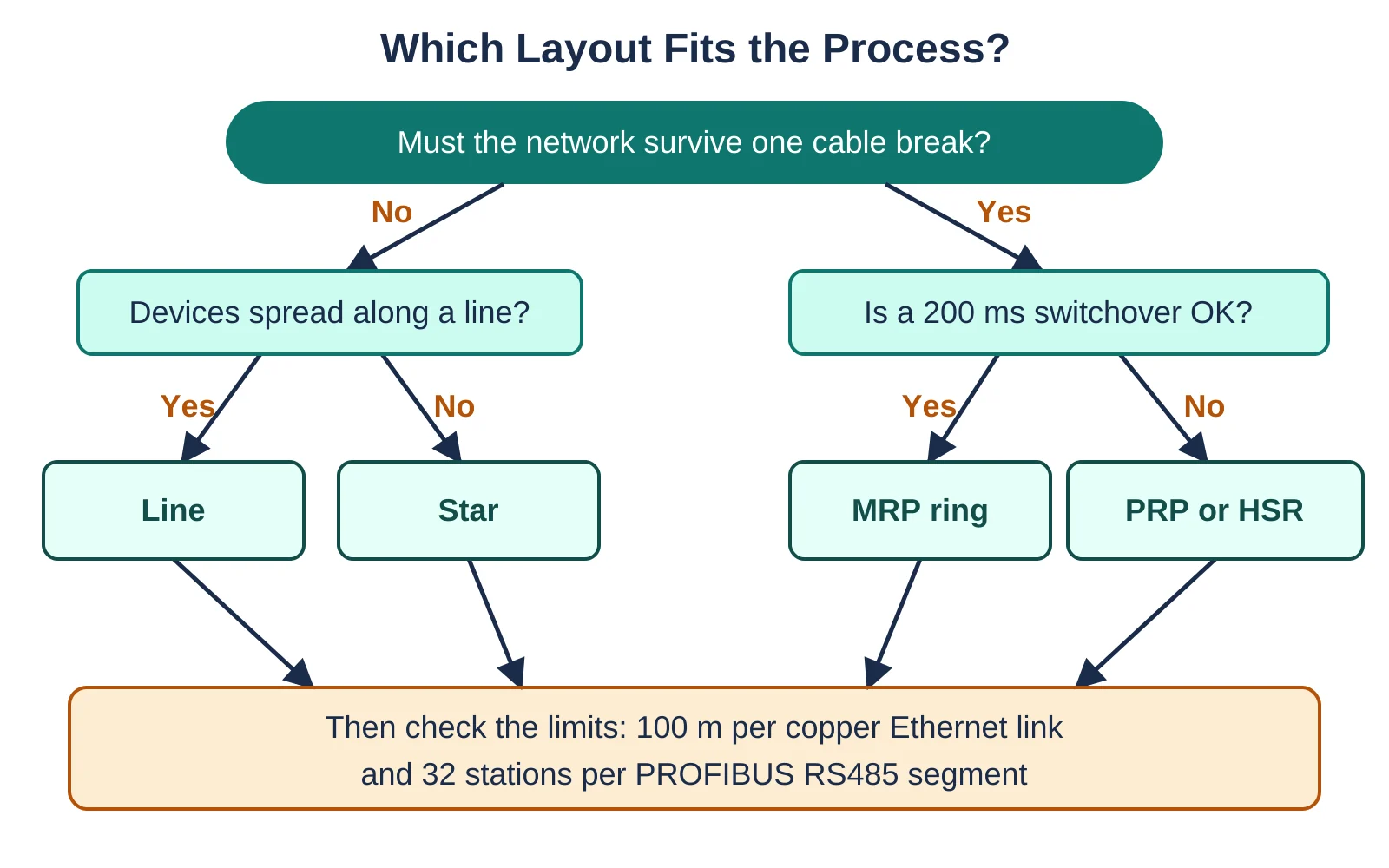
Work through the network topology selection in this order and record the reasons in the design document.
Segmentation and layout go together, so read OT network segmentation and IEC 62443 zones and conduits before you freeze the design. VLAN basics are in subnet and VLAN differences, and this router vs switch explainer helps when you decide where routing happens.
Mark the MRM switch and both ring ports on the panel drawing, so the blocked port is easy to find during a shutdown.
Field Troubleshooting of Network Topology Faults
Most topology faults show up as a group of devices dropping out together. Look at the first lost station, since the cable or port just before it is the usual suspect.
| Symptom | Likely cause | What to check |
|---|---|---|
| All devices after one point lost on a line | Broken cable or dead device in the chain | Port link LEDs on both sides of the first lost device |
| Whole PROFIBUS segment unstable | Missing or extra terminator | Terminator switches on first and last connector only |
| Ring alarm but process running | One ring link down, MRM has opened the port | MRM diagnostics, then replace the cable |
| Network flooded, all devices slow | Loop closed without MRP | Ring ports and MRP role on every switch |
| Whole star area lost | Central switch or its power supply failed | Switch power, then a spare switch |
- Every PROFIBUS segment terminated at both ends and nowhere else.
- One MRM per ring, all other ring switches set as MRC.
- MRP recovery setting checked against the IO device watchdog time.
- No copper link longer than 100 m.
- Ring ports labelled on the drawings and in the switch configuration.
- A spare switch available for each area.
Fieldbus layouts follow similar rules: Foundation Fieldbus uses trunk and spur wiring, and CAN bus and CANopen is a terminated line bus. For wireless instruments, ISA100 Wireless is an example of a mesh capable network.
If you are new to PROFINET, start with our PROFINET communication guide and the OSI vs TCP/IP model before you design a ring. The video below animates each network topology type.
Network Topology FAQ
Network topology is the shape in which devices and cables are connected. A PROFIBUS DP segment is a bus, a PROFINET daisy chain is a line and a PROFINET loop with MRP is a ring.
Each shape decides which single fault stops communication.
A star connects every device to one central switch, so the switch is a single point of failure. A ring closes the loop with one blocked port and survives one cable fault.
An MRP ring recovers within 500, 200 or 30 ms, while a star has no automatic recovery.
Use links = n × (n minus 1) ÷ 2, where n is the number of nodes. For 10 nodes that gives 10 × 9 ÷ 2 = 45 links.
A ring of the same 10 nodes needs 10 links and a line needs 9.
A ring with MRP is the usual choice, because it survives any single cable or switch fault with a recovery of 200 ms in typical PROFINET use.
If that gap is too long, PRP or HSR from IEC 62439 part 3 give zero recovery time.
Terminating resistors at both ends of the trunk stop signal reflections on the RS485 line. Without them, or with an extra terminator in the middle, stations drop out.
Only the first and last connector should have the terminator switched on.
The usual mistake is closing the loop before MRP is configured on every ring switch. Standard Ethernet does not allow loops, so frames circulate and flood the network.
Set one switch as MRM and the rest as MRC, then plug in the last cable.
Related Articles
- PROFIBUS vs PROFINET Differences
- DCS Network Redundancy: Ring, Star and Dual
- Network Switches for SCADA and DCS
- Industrial Fiber Optic Network
- Ethernet Cable Length and Types
External References
- PROFINET Design Guideline, PI Order No. 8.062 (PDF)
- Beckhoff Information System: PROFIBUS Cabling
- Wikipedia: Network topology
What We Learn Today
- Network topology decides which single fault stops plant communication, from the central switch in a star to the trunk and terminators on a PROFIBUS bus.
- An MRP ring recovers within 500, 200 or 30 ms for up to 50 switches, while PRP and HSR send frames over two paths for zero recovery.
- A full mesh of n devices needs n × (n minus 1) ÷ 2 links, so 10 devices need 45 links against 10 for a ring.