
SCADA redundancy architecture means protecting every layer that keeps a SCADA system running, the server, the network path, and the database, not just one of them.
In this guide, we explain how each layer fails over on its own, how the three layers work together, and how to estimate the combined uptime of a fully redundant SCADA system.
SCADA redundancy architecture is the practice of duplicating the SCADA server, the communication network, and the database, so a single failure in any one layer does not stop operators from monitoring and controlling the plant.
SCADA Redundancy Architecture: How this is Useful in Plants
A SCADA system has three main jobs. It collects data, moves that data across a network, and stores it in a database for trends and reports.
Each of these three jobs can fail on its own. A server can crash. A network cable can break. A database can run out of disk space or corrupt a file.
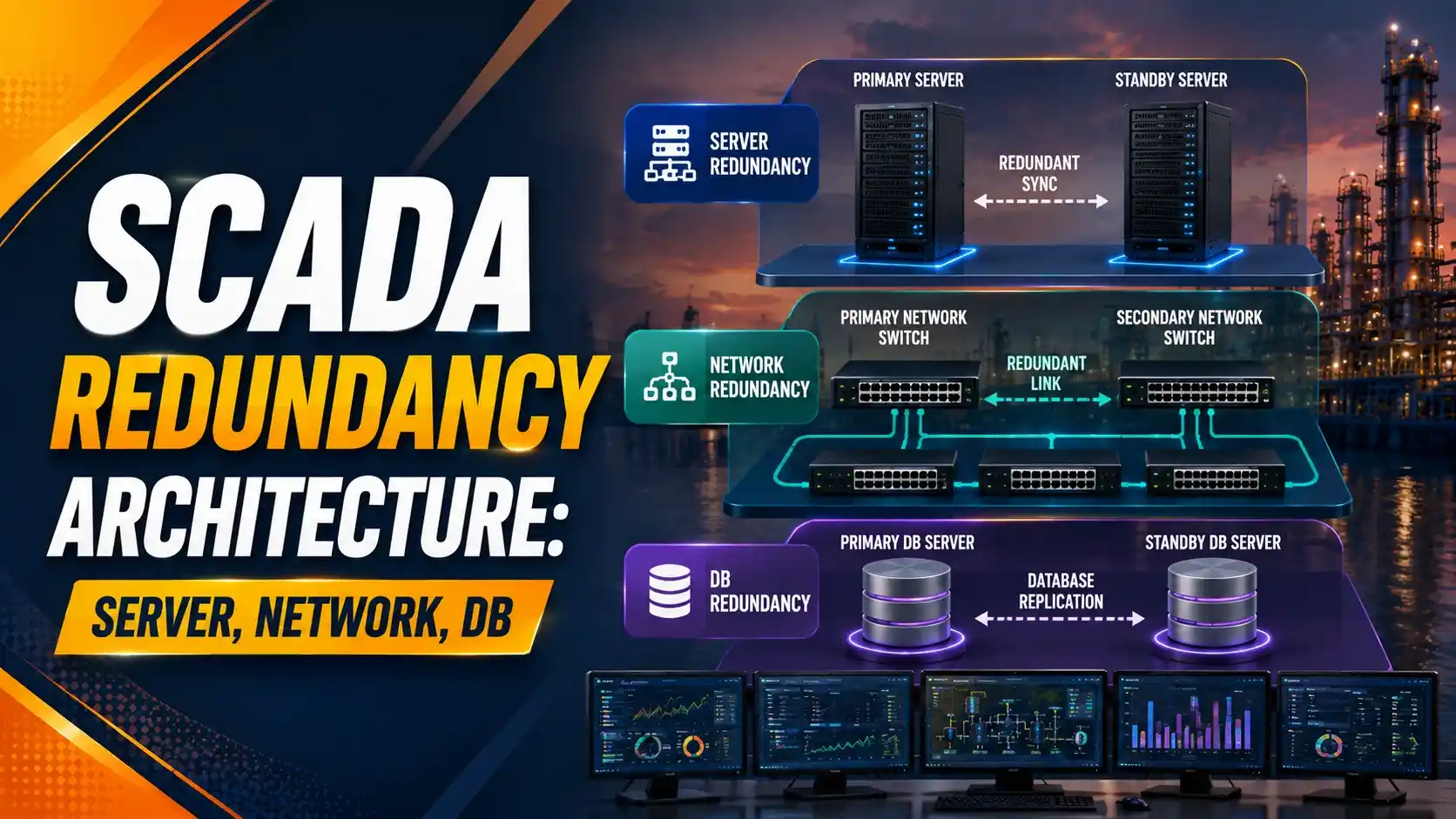
SCADA redundancy architecture protects all three jobs at once, not just the most obvious one.
A plant that only duplicates the server, but not the network or the database, still has two remaining weak points, similar to the terminology gaps covered in our PLC, PAC, RTU, DCS and SCADA terms guide.
This builds on the ideas in our DCS controller redundancy guide and our DCS network redundancy guide, but applies them specifically to the SCADA layer that sits above the controllers.
The Three Layers a SCADA System Must Protect
Server Redundancy
A primary and standby SCADA server run side by side. If the primary fails, the standby takes over the operator screens and control functions.
Network Redundancy
A second communication path, ring, star, or dual, keeps data flowing between the servers, RTUs, and field devices even if one cable or switch fails.
Database Redundancy
The historian or SCADA database mirrors its records to a second copy, so stored trends and alarms survive a disk or server failure.
How SCADA Server Redundancy Works
Most SCADA platforms use a hot standby pair of servers. Both machines run the same project, but only the primary server actively drives the operator screens.
The standby server constantly receives updates from the primary, tags, alarms, and current values, so it is always ready to take over.
When the primary server fails or loses network contact, the standby detects this and switches to active mode automatically, according to this guide to hot standby SCADA server architectures. Operators usually see only a brief screen refresh, not a full outage.
How Network Redundancy Fits Into the SCADA Layer
The SCADA server pair is only useful if operators and field devices can actually reach it. That is where network redundancy comes in.
Ring, star, and dual network designs, which we cover in detail in our DCS network redundancy guide, apply directly to the SCADA layer as well.
A SCADA system with two redundant servers but only one network path still has a single point of failure. The network must be duplicated too.
How Database and Historian Redundancy Works
The SCADA database stores current values, alarms, and event logs. The historian stores long-term trend data, which we explained in our DCS historian guide.
Database redundancy usually means the primary and standby servers each keep their own synchronized copy of the database, updated continuously as new data arrives.
Some systems go further and replicate the database to a separate disaster recovery site, so even a total loss of the primary control room does not wipe out historical records, as described in this overview of SCADA redundancy and automatic failover.
This overlaps with the network protection ideas in our SCADA network security guide.
Comparing the Three Redundancy Layers
| Layer | What Fails Without It | Typical Method |
|---|---|---|
| Server | Operator screens and control go dark | Hot standby server pair |
| Network | Servers cannot reach RTUs or each other | Ring, star, or dual network path |
| Database | Trends, alarms, and history are lost | Synchronized or mirrored database copy |
Why All Three Layers Must Work Together
These three layers are not separate choices. They are links in one chain, and the whole SCADA system is only as strong as the layer that was skipped.
If even one of these three is single, that single layer sets the real limit on how reliable the whole SCADA system actually is.
Try It: SCADA System Availability Calculator
This calculator estimates the combined availability of a SCADA system with all three layers, server, network, and database, each protected by its own redundant pair.
Let Us Take an Example
Take a SCADA system where the server, network, and database units each have an MTBF of 20,000 hours and an MTTR of 6 hours.
MTTR = 6 hours
Step 1: Single Unit Availability = 20,000 ÷ (20,000 + 6) = 0.9997001
Step 2: Redundant Pair Unavailability = (1 − 0.9997001)² = 0.0000001 (about 0.047 min/yr downtime alone)
Step 3: Overall System Availability (3 layers) = Pair Availability³ = 0.99999973
Step 4: Overall Downtime = about 0.14 minutes per year
Even with three separate layers to protect, the fully redundant SCADA system still loses only a fraction of a minute per year, as long as every layer, not just the server, is actually duplicated.
A Simple Way to Plan SCADA Redundancy
List all three layers before designing anything
Write down the server, network, and database plan together, not one at a time.
Size a hot standby server pair
Match hardware and software versions exactly between the primary and standby servers.
Duplicate the network path
Choose a ring, star, or dual design based on plant layout, not just cost.
Mirror the database continuously
Confirm the standby database updates in near real time, not on a delayed schedule.
Test a full failover, not just individual layers
Fail the server and the network together during commissioning to see how the system actually behaves.
Document the recovery procedure
Make sure operators know what a failover looks like on screen, so it is not mistaken for a real fault.
Good Practices for SCADA Redundancy Design
✓ Do
- Protect the server, network, and database layers together, as one design
- Keep primary and standby servers on matched software versions
- Test complete failover scenarios during commissioning, not just on paper
- Monitor the standby layer's health continuously, not only after a failure
✗ Don't
- Assume a redundant server alone makes the whole SCADA system redundant
- Route both network paths through the same physical cable tray
- Let the standby database fall out of sync without an alert
- Skip periodic failover drills once the system is commissioned
Worth Reading if You Want to Go Deeper
Questions Students and Technicians Often Ask
External References
- PLC DCS Hub: SCADA Server Redundancy, Hot Standby Guide
- VTScada: SCADA Redundancy and Automatic Failover
What We Learn Today
- SCADA redundancy architecture protects three layers together: the server, the network, and the database.
- A hot standby server pair takes over automatically when the primary fails, but only if the network and database behind it are also duplicated.
- A worked example showed a fully redundant, three-layer SCADA system losing only about 0.14 minutes per year, compared with 0.047 minutes for one redundant layer alone.
- Testing a full, combined failover during commissioning reveals problems that testing each layer separately can miss.