A control valve that will not move, hunts around setpoint or sits at its fail position is one of the most common calls an instrument technician gets on a night shift. This guide turns those symptoms into a clear order of checks, from the air header and loop voltage to the linkage, relay and smart diagnostics.
Most positioner complaints are not caused by the positioner at all, but by air, wiring, linkage or the valve itself. This valve positioner troubleshooting guide works through each symptom with real manufacturer limits and a calculator for the voltage your positioner actually receives.

What Is Valve Positioner Troubleshooting?
Valve positioner troubleshooting is the structured process of finding why a control valve does not follow its 4 to 20 mA or HART command, by checking the signal, air supply, feedback linkage, I/P stage, relay and the valve itself in a fixed order. Done well, it tells you within minutes whether the fault sits in the positioner, the actuator, the valve body or the control loop.
- Signal first: at least 4.0 mA and enough loop voltage at the terminals
- Air next: steady, clean, dry and at least 0.3 bar above actuator need
- Feedback arm, magnet or coupling: no slip, right pin hole, right direction
- Smart alerts: travel deviation, supply pressure and drive signal
If you are new to the device itself, read how a control valve positioner works before starting, because every check below follows the signal path inside it. For faults that clearly belong to the body, trim or seat, our wider guide on control valve troubleshooting covers the valve side.
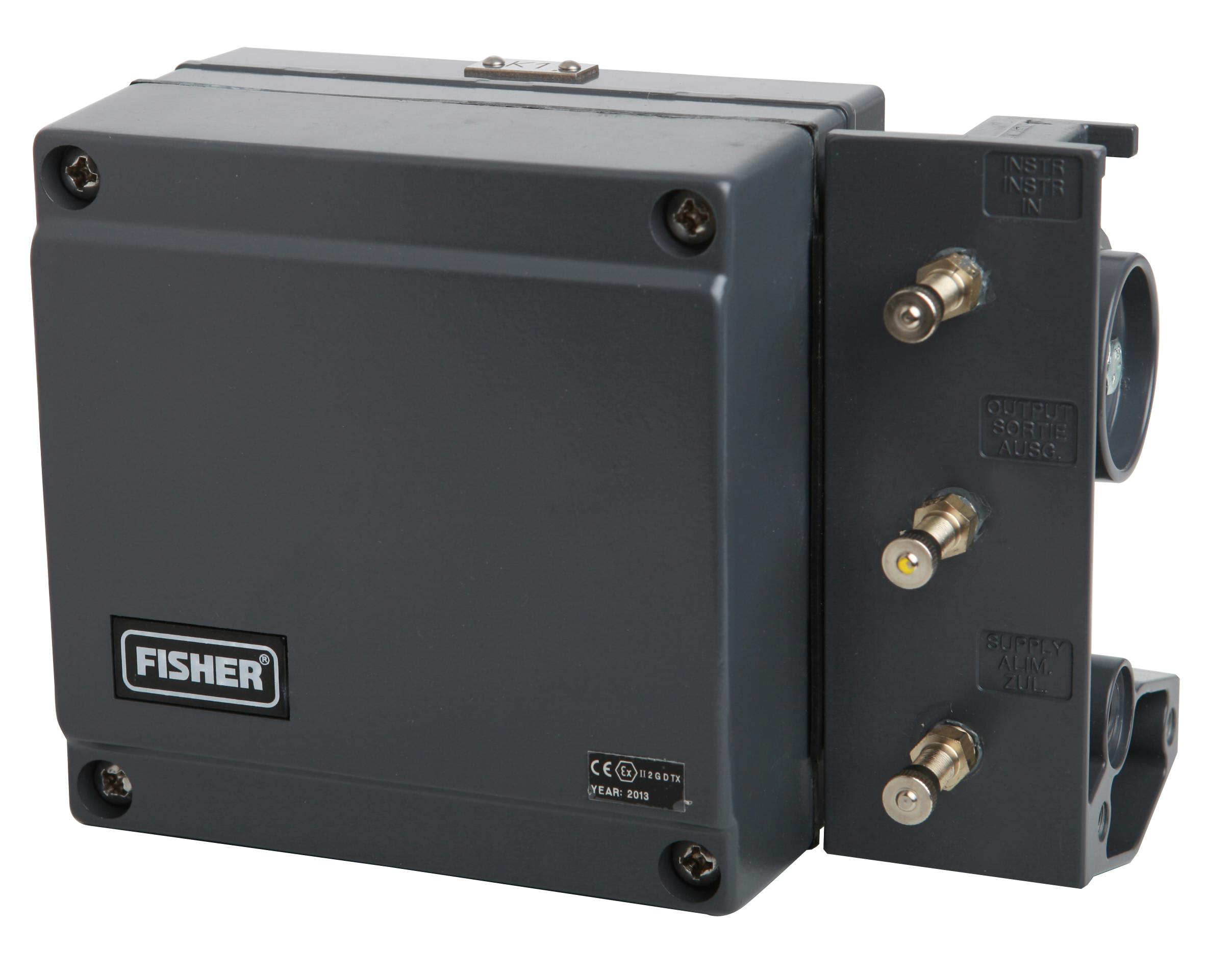
The photo shows a classic electro pneumatic positioner with an I/P module and a mechanical feedback arm, still common beside newer digital valve controllers.
Valve Positioner Troubleshooting Symptom Table
Start every job by writing down exactly what the valve does, because each symptom points to a short list of causes. The table below groups the most common valve positioner problems with the first check to make.
| Symptom | Likely Causes | First Check |
|---|---|---|
| Valve does not move | No signal, no air, handwheel engaged, seized stem | mA at terminals, supply gauge, handwheel |
| Stuck at fail position | Supply lost, solenoid tripped, relay or I/P dead | Supply and output gauges, solenoid state |
| Cannot reach full travel | Low supply, wrong span or travel limit, high friction | Supply under load, travel limits, packing |
| Hunting or cycling | High gain, narrow deadband, stick slip, loose linkage | Loop in manual, then linkage and friction |
| Slow stroke | Small or long tubing, blocked exhaust, large actuator | Tubing size, exhaust port, regulator flow |
| Wrong direction | Direct or reverse action set wrong, ports swapped | Action setting and tubing to the actuator |
THINTANK, a control valve maker, puts it bluntly in its commissioning guide: do not replace the positioner solely because the valve does not move. In valve positioner troubleshooting the air set, tubing and linkage deserve a look before the electronics.
Fisher introduced the 3500 Positrol pneumatic valve positioner in 1949, according to the Emerson Automation Experts blog. Digital valve controllers arrived only in 1994, so many of the basic air and linkage checks are over 70 years old.
Positioner Not Responding to 4 to 20 mA Signal
When the valve ignores the DCS output, first measure the current in series at the positioner terminals. The Emerson DVC6200 manual gives 4.0 mA as the minimum control current and 3.5 mA as the minimum to avoid a microprocessor restart, so a loop sitting near 3.6 mA can reboot the device again and again.
Next check the voltage, because a two wire positioner takes its power from the loop. The same manual asks for at least 10 V DC at the instrument for HART communication, and the HART protocol needs that headroom to work reliably.
Emerson example: 18.5 V card, 2.3 V HART filter
1000 ft of Belden 9501 at 21.05 mA drops 1.01 V
Voltage available = 18.5 minus 2.3 minus 1.01 = 15.19 V
15.19 V is above 10 V, so the loop can drive the positioner
Measure loop voltage at the positioner terminals with the valve at 20 mA, not at 4 mA. A loop that looks fine at minimum current can collapse at full current and leave the valve short of its last few percent of travel.
Air Supply Checks in Valve Positioner Troubleshooting
Supply air causes a large share of positioner faults, so check the instrument air filter regulator next. Emerson specifies the DVC6200 supply as at least 0.3 bar above the maximum actuator requirement and no more than 10 bar, or the actuator rating if that is lower.
Air quality matters as much as pressure. The manual quotes ISA 7.0.01, which accepts particles up to 40 micrometres but recommends 5 micrometre filtration and no more than 1 ppm lubricant, with a dew point at least 10 °C below the lowest ambient, a point we cover in dew point in instrument air.
- Supply gauge holds steady while the valve strokes fully, with no large dip.
- Filter bowl and drain are free of water, oil and rust flakes.
- Regulator set to the value on the valve datasheet, not just full header pressure.
- Tubing size and length match the actuator volume, with no kinks or crushed runs.
- No leaks at fittings when tested with soap solution.
Feedback Linkage and Travel Calibration
The positioner only knows where the stem is through its feedback arm, magnet or rotary coupling. If that link slips or sits in the wrong pin hole, valve positioner troubleshooting will show a healthy positioner controlling the wrong number.
Check that the arm is roughly level at 50 % travel, that the follower pin sits in the hole marked for the actual stroke, and that nothing rubs the valve limit switch box or yoke. Once the mechanics are right, follow our valve positioner calibration procedure for zero and span.
Control Valve Hunting Caused by the Positioner
Hunting is a steady cycle of the valve and the process around setpoint. In valve positioner troubleshooting, always put the loop in manual first: if the cycle stops, the PID tuning is the likely cause, but if the valve still cycles at a fixed output, the fault sits in the valve assembly, as explained in control valve hunting and oscillation.
Stick slip from packing friction shows up as a sawtooth on the controller output, a pattern covered in control valve stiction detection. If the valve has a pneumatic volume booster, open its bypass needle a little, because a fully closed bypass is a classic cause of overshoot and cycling.
I/P Converter, Relay and Output Faults
If the input signal and supply are both good but the output gauge does not change, the I/P stage or the pneumatic relay is the next suspect. On older positioners a blocked nozzle or a dirty flapper caused by wet or oily air is very common, and cleaning sometimes restores normal action.
Watch the output gauge while you slowly vary the mA signal. A smooth change in output pressure with no stem movement points to the actuator or valve, while a frozen or jumping output points to the I/P, relay or contaminated air passages.
Remember that a tripped solenoid between the positioner and actuator also leaves the valve at its fail position. Confirm the solenoid state using our notes on the solenoid valve working principle and check the expected fail action in fail open, fail closed and fail locked valves.
Electro pneumatic positioners were introduced in the 1970s, became fully digital in the 1990s, and mechanical linkages were removed around 2004, according to Ken Hall of Emerson writing in Processing Magazine. Linkageless feedback removed one of the most common sources of slip and wear.
Smart Positioner Diagnostics and Alerts
A digital valve controller can tell you what is wrong before anyone climbs to the valve. The Emerson Automation Experts blog says that enabling three basic alerts, travel deviation, supply pressure and drive signal, could address up to 80 % of control valve failures.
In the DVC6200 manual the travel deviation alert is enabled by default at 5 % for 9.99 seconds. A valve signature test adds friction, bench set and seat load data, which makes smart valve positioner troubleshooting much faster than guessing with a hand pump.
Valve Positioner Troubleshooting Calculator for Loop Voltage
Solved Example: Positioner Behind a Barrier
Now add a barrier with an assumed 250 Ω end to end resistance into the same loop. This is a common case when a positioner is moved into a hazardous area during a revamp.
Drop at 21.05 mA = 298 × 0.02105 = 6.27 V
Voltage available = 18.5 minus 2.3 minus 6.27 = 9.93 V
Required = 10 V, so the loop is short by 0.07 V
Fix: higher compliance card, isolator or lower cable resistance
The valve may stroke normally in the middle of its range yet fail to reach full open, and HART may drop out near 20 mA. This is why voltage belongs early in any valve positioner troubleshooting checklist.
For a quick terminal voltage check on any HART loop, our HART loop voltage budget calculator applies the same method to transmitters as well as positioners.
Valve Positioner Troubleshooting in 8 Field Steps
Step 8 is often skipped, yet the record is what lets the next shift spot a repeat fault. Our guide on the as found and as left certificate shows a simple format you can reuse.
Common Mistakes in Positioner Fault Finding
- Alerts arrive before the process upsets.
- Travel and drive data show friction trends.
- Many checks can be done from the control room.
- Alerts must be enabled and set per valve.
- Data still needs a trained person to read.
- Mechanical faults still need a site visit.
Before you remove a positioner, swap only the I/P module or relay if spares are on hand and the fault follows the part. Also check the actuator bench set, because a wrong spring range looks just like a weak positioner.
Emerson DVC6200 Instruction Manual PDF
Video: Troubleshooting Hunting or Oscillating Valves
Valve Positioner Troubleshooting FAQ
First confirm that the positioner sees at least 4 mA and enough voltage at its terminals. Then check supply air, the output gauge and any solenoid between the positioner and the actuator.
If the output pressure changes but the stem does not, the actuator or valve is the problem. Look for a seized stem, an engaged handwheel or very tight packing.
Common causes are gain set too high, a very narrow deadband, stick slip friction in the packing and a loose feedback linkage. A volume booster with its bypass fully closed can also make the valve cycle.
Put the loop in manual first to separate valve problems from PID tuning. If the valve still cycles at a fixed output, the fault is in the valve assembly itself.
Vary the input signal slowly and watch the positioner output gauge. A healthy I/P and relay give a smooth rise and fall in output pressure as the current changes.
A frozen, jumping or very slow output with good supply air points to the I/P stage or relay. Wet or oily air is the usual root cause, so fix the air quality as well.
The supply must be above what the actuator needs to stroke fully under process load. Emerson asks for at least 0.3 bar above that requirement for the DVC6200, up to a limit of 10 bar.
Never exceed the actuator rating, even if the header is higher. Always set the regulator to the value on the valve datasheet for that particular valve.
Yes, with a smart HART positioner you can read alerts, travel, drive signal and supply pressure remotely. This often shows whether the fault is air, friction or signal before anyone goes to the field.
Mechanical faults such as a loose arm or leaking tubing still need a site check. Use remote data to plan the visit and carry the right spare parts.
Related Articles
- Control Valve Positioner Working
- Valve Positioner Calibration Procedure
- Control Valve Hunting and Oscillation
- Control Valve Stiction Detection
- Control Valve Signature Test Diagnostics
External References
- FIELDVUE DVC6200 HW2 Digital Valve Controller Instruction Manual, Emerson
- Digital Valve Controller Diagnostic Alerts Maximize Maintenance Efficiency, Emerson Automation Experts
- Control Valve, Wikipedia
What We Learn Today
- Valve positioner troubleshooting starts with signal and air, because low loop voltage or poor supply air explains many faults that look like a failed positioner.
- Feedback linkage slip, wrong pin holes and reversed action make a healthy positioner control the wrong position, so check mechanics before calibration.
- Smart alerts such as travel deviation, supply pressure and drive signal can point to the real fault before anyone climbs up to the valve.