A thermocouple only gives you a few millivolts, and that number means nothing until you add the cold junction voltage and read the right table. This guide shows the exact method with NIST values, two solved examples and a calculator you can use in the field.
Converting thermocouple millivolts to temperature is easy once you know why the curve is not a straight line and where the cold junction voltage goes. We use NIST ITS 90 values, solved examples and a Type K calculator to make the method stick.
What Is Thermocouple mV to Temperature Conversion?
Thermocouple mV to temperature conversion turns the small voltage of a thermocouple into the hot junction temperature, using a standard reference table or polynomial made for a cold junction at 0 °C. You first add the voltage of the actual cold junction to the measured millivolts, then look up the total in the table for that thermocouple type.
- Total emf = measured mV + emf of the cold junction temperature
- Look up the total emf in the NIST ITS 90 table for the correct type
- Type K: 4.096 mV at 100 °C and 41.276 mV at 1000 °C
- Type J: 5.269 mV at 100 °C, Type T: 4.279 mV at 100 °C
- Never add the cold junction temperature to the table temperature
The voltage comes from the Seebeck effect at the junction of two different metals, a basic idea covered in our page on basics of thermocouples and RTD. Each letter type uses a different metal pair, so each has its own table and range, as listed in types of thermocouples and ranges.
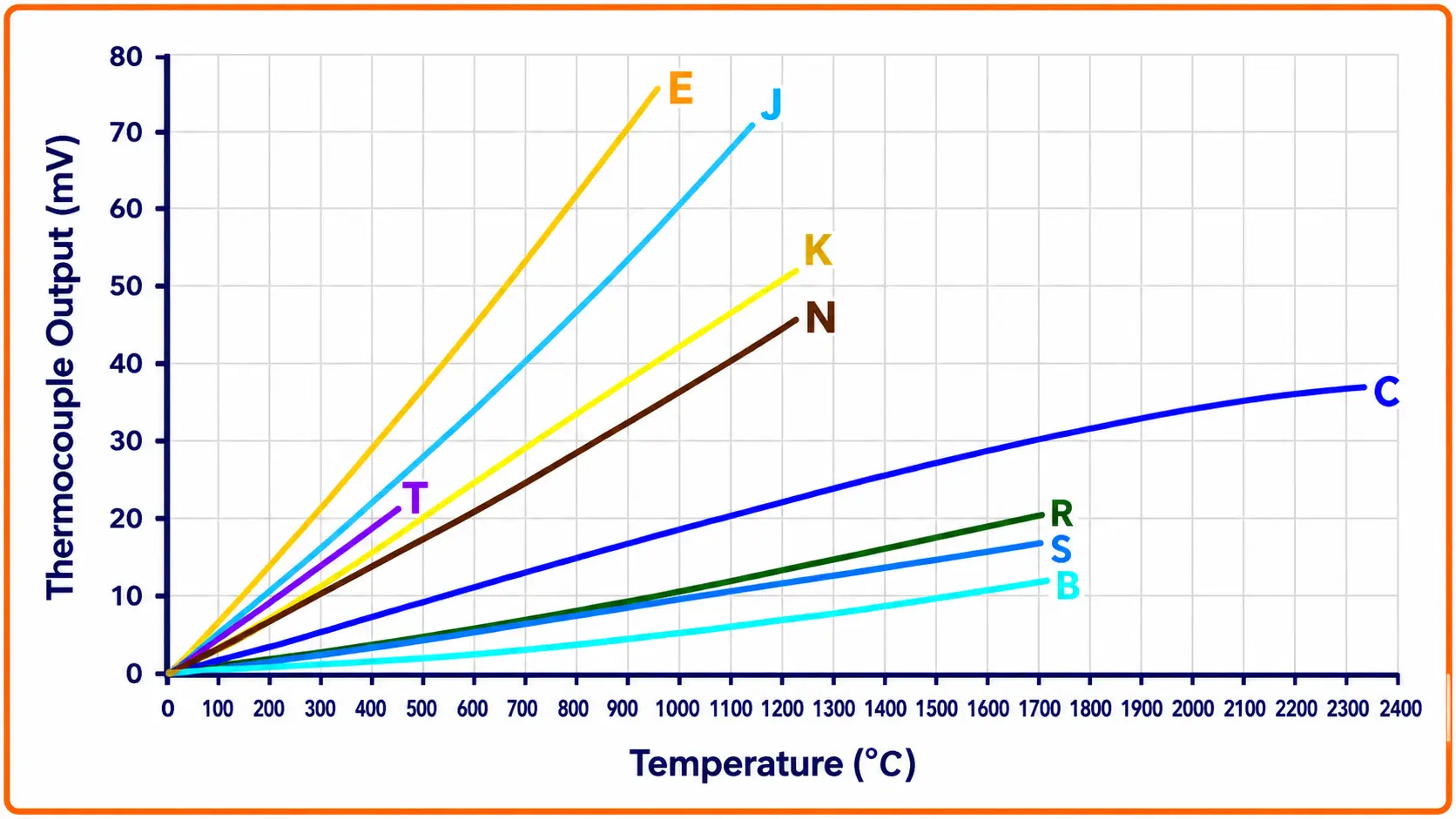
Each line on the chart bends slightly, which is why a fixed mV per degree factor is never exact.
Thermocouple mV Table for Type K, J and T
The values below come straight from the NIST ITS 90 Thermocouple Database, with the reference junction at 0 °C. Keep this short table on your calibration sheet for quick checks during a thermocouple mV to temperature conversion.
| Temperature | Type K (mV) | Type J (mV) | Type T (mV) |
|---|---|---|---|
| 0 °C | 0.000 | 0.000 | 0.000 |
| 20 °C | 0.798 | 1.019 | 0.790 |
| 25 °C | 1.000 | 1.277 | 0.992 |
| 30 °C | 1.203 | 1.537 | 1.196 |
| 100 °C | 4.096 | 5.269 | 4.279 |
| 200 °C | 8.138 | 10.779 | 9.288 |
| 300 °C | 12.209 | 16.327 | 14.862 |
| 400 °C | 16.397 | 21.848 | 20.872 |
| 500 °C | 20.644 | 27.393 | not in range |
| 600 °C | 24.905 | 33.102 | not in range |
| 700 °C | 29.129 | 39.132 | not in range |
| 800 °C | 33.275 | 45.494 | not in range |
| 1000 °C | 41.276 | 57.953 | not in range |
For Type K the NIST table ends at 54.886 mV at 1370 °C, while Type T stops at 400 °C and suits low ranges.
Type K gives exactly 1.000 mV at 25 °C in the NIST table. That makes it a handy mental check, since a Type K loop sitting at room temperature should read close to zero on a meter at the same temperature.
Why Thermocouple Output Is Not Linear
The Seebeck coefficient, or the mV produced per degree, changes with temperature. Texas Instruments lists it at 0 °C as 39.48 µV/°C for Type K, 50.37 µV/°C for Type J and 38.74 µV/°C for Type T in its application note on thermocouple measurements.
From the NIST table, Type K rises 4.042 mV between 100 and 200 °C but only 3.950 mV between 900 and 1000 °C. Dividing the millivolts by one fixed factor would therefore give a different error at every point of the range.
(16.397 minus 12.209) ÷ 100 = 0.0419 mV/°C
≈ 41.9 µV/°C, not 39.48 µV/°C
Using the 0 °C slope here would read about 6 % high
This is why transmitters store the full NIST curve or polynomial for each type. Our note on thermocouple types comparison shows how the curves of different types also differ in shape, not only in size.
Cold Junction Compensation Formula and Method
The meter or transmitter terminals form a second junction, called the cold or reference junction, and it creates its own voltage. Fluke notes that the traditional reference was 0 °C in an ice bath, which is simply not practical in many applications, so modern instruments measure the terminal temperature and correct for it, as explained in cold junction compensation in thermocouples.
T hot = table lookup of E total
E(T cold junction) is read from the same table
Never use T hot = T table + T cold junction
Texas Instruments explains that because the output is nonlinear, it is wrong to simply add the cold junction temperature to the temperature found from the measured voltage. The cold junction temperature must first be turned into a voltage, added, and only then converted back.
These six steps are the whole thermocouple mV to temperature method, whether you do it by hand, in a PLC block or inside a smart transmitter.
Measure the cold junction temperature right at the terminal strip, not the room or panel air. A hot field panel can sit well above control room temperature, and any error in that value goes straight into the result.
Solved Example: Thermocouple mV to Temperature for Type K
A Type K thermocouple reads 12.000 mV at the transmitter terminals, and the terminal block is at 25 °C. We need the furnace temperature using the NIST table.
E total = 12.000 + 1.000 = 13.000 mV
NIST table: 319 °C = 12.998 mV, 320 °C = 13.040 mV
T hot ≈ 319.05 °C, shown as 319.1 °C
Wrong method: 12.000 mV ≈ 295 °C, plus 25 = 320 °C
In this case the wrong method is only about 1 degree out, because the Type K slope near room temperature and near 300 °C is similar. The habit is still wrong, so always add voltages, not temperatures.
Second Example: Type J with a Warm Panel
A Type J sensor on a reactor jacket gives 14.000 mV, and the marshalling panel terminals are at 30 °C. From the NIST table, E(30 °C) for Type J is 1.537 mV.
NIST: 285 °C = 15.496 mV, 286 °C = 15.552 mV
Fraction = (15.537 minus 15.496) ÷ 0.056 = 0.73
T hot ≈ 285.7 °C
Linear interpolation between two rows one degree apart is accurate enough for any field check. A multifunction process calibrator with the full table built in saves even that step.
Thermocouple mV to Temperature Calculator for Type K
The calculator uses the NIST ITS 90 Type K reference function for the cold junction and the NIST inverse polynomial for the total. In our check it matched the NIST table within about 0.05 degrees from 0 to 1300 °C.
Once you have the temperature, check what the loop should show in mA with our 4 to 20 mA signal conversion calculator. If the loop uses a Pt100 instead, the matching tool is the RTD resistance to temperature calculator.
How to Test a Thermocouple With a Multimeter
A multimeter on the DC mV range is enough for a first check. Remember that it reads the voltage relative to its own terminals.
If the reading falls when the process gets hotter, the legs are probably reversed somewhere, and our guide on thermocouple polarity identification shows how to find the swap. A steady reading near zero at a hot point often means the junction has failed or the loop is shorted at a junction box.
A thermocouple only senses the temperature difference between its two junctions, not an absolute value. Dwyer Omega puts it simply: the output voltage corresponds to the temperature differential between the two junctions.
Extension Wire, Copper Joints and Other Error Sources
Every joint between dissimilar metals between the sensor and the terminals adds a small unwanted voltage. That is why the run must use matching thermocouple extension wire all the way to the reference junction, with no copper section in between.
| Symptom | Likely Cause | Field Fix |
|---|---|---|
| Reads low by a steady amount | Copper cable or wrong extension grade | Replace with matching extension cable |
| Reads down when process rises | Reversed polarity at one joint | Check colour code at every termination |
| Reading jumps or goes upscale | Open junction, burnout drive active | Check continuity, replace element |
| Slow drift over months | Sensor ageing at high temperature | Replace or recalibrate in a dry block |
| Wrong value on new loop | Transmitter set for wrong type | Correct the type in configuration |
An open circuit pushes the transmitter to the burnout value, a feature explained in thermocouple burnout detection. A slow change after long service at high temperature is usually drift, and thermocouple drift causes and prevention covers why it happens.
Converting mV in a Transmitter or PLC
Smart temperature transmitters store the NIST tables and measure their own terminal temperature, so the thermocouple mV to temperature work happens inside the device. You only choose the right type and range, as described in thermocouple transmitter configuration with HART.
When a DCS reading looks wrong, read the raw mV and terminal temperature first, then convert by hand. If your hand result matches the DCS, the problem is in the sensor or wiring, not in the conversion.
Advantages and Limits of Manual Conversion
- Proves whether the sensor or the transmitter is at fault.
- Needs only a meter, a thermometer and a table.
- Builds a clear picture of cold junction effects.
- Slow compared with a calibrator.
- Errors creep in from wrong table rows.
- Meter terminal temperature is easy to misread.
- Thermocouple type confirmed from tag, cable colour and transmitter setting.
- Terminal temperature measured at the actual reference junction.
- Cold junction mV taken from the same type table.
- Voltages added before the table lookup, never temperatures.
- Result compared with DCS value and noted on the loop sheet.
For a formal check, follow the steps in our thermocouple calibration procedure and record as found and as left values. Our guide to temperature measurement errors lists other effects such as immersion and radiation that no table can correct.
Texas Instruments Thermocouple Measurement Guide PDF
Video: Understanding Cold Junction Compensation
Thermocouple mV to Temperature FAQ
Measure the millivolts at the terminals and note the terminal temperature. Convert that terminal temperature to mV using the table for the same type and add it to the reading.
Then find the total millivolts in the NIST table and read the temperature. Interpolate between the two nearest rows for a more exact answer at site.
The NIST ITS 90 table gives 4.096 mV for Type K at 100 degrees with the reference junction at 0 degrees. At 1000 degrees the value rises to 41.276 millivolts.
These figures assume the cold end is at zero. With a warm cold end the meter shows less, so you must add the cold junction voltage back.
The thermocouple curve is not a straight line, so a degree at room temperature is worth a different number of millivolts than a degree at the hot end. Adding temperatures mixes two different slopes.
Adding voltages keeps everything on the same curve. Texas Instruments describes this voltage method as the correct approach for cold junction compensation.
Disconnect it from the transmitter and check continuity first, since an open loop means a broken junction or wire. Then check insulation from each leg to the sheath.
Next read the DC millivolts with the process hot and note the terminal temperature. Convert by hand and compare with the DCS reading to see which part is at fault.
No, the relation is nonlinear, and the slope changes across the range. For Type K, Texas Instruments gives 39.48 µV per degree at zero, while the NIST table shows about 41.9 µV per degree near 350 degrees.
A single factor is only good for a rough estimate. Use the NIST table or polynomial for any real measurement or calibration.
Related Articles
- Cold Junction Compensation in Thermocouple
- Types of Thermocouples and Ranges
- Thermocouple Calibration Procedure
- Thermocouple Extension Wire
- Thermocouple Burnout Detection
External References
- A Basic Guide to Thermocouple Measurements, Texas Instruments
- What Is Cold Junction Compensation in Thermocouples, Fluke
- Thermocouple, Wikipedia
What We Learn Today
- Thermocouple mV to temperature conversion needs the measured voltage plus the cold junction voltage, and the total is then looked up in the NIST table.
- The thermocouple output is nonlinear, so the Type K slope moves from 39.48 µV per degree at zero to about 41.9 µV per degree near 350 degrees.
- Always add voltages, never temperatures, during thermocouple mV to temperature work, and use matching extension wire so no copper junction adds a hidden error.