Millions of smart transmitters already speak HART, but the slow 1200 bit per second signal on a 4 to 20 mA loop limits how much data reaches the control room. HART IP carries the same commands over Ethernet, so diagnostics, configuration and asset data move thousands of times faster.
This Ethernet form of HART keeps the familiar HART commands and device data model but replaces the slow analog loop path with Ethernet and IP addressing. It links gateways, multiplexers and new Ethernet APL instruments directly to asset management and control systems.

What Is HART IP?
HART IP is the version of the HART protocol that runs over Internet Protocol networks such as Ethernet, using IP addresses instead of the polling addresses of a classic loop. It carries the same command set used in HART protocol communication, so existing host software understands it with very little change.
FieldComm Group added HART IP to the HART specification in 2012, although Control Engineering notes that the idea was first introduced in 2007 for links between I/O systems, multiplexers and WirelessHART gateways. Today it is the native protocol of many Ethernet APL field instruments.
On a normal loop, the digital HART signal rides on top of the analog current described in why 4 to 20 mA is used. That keeps the analog value safe, but the frequency shift keying signal is limited to 1200 bits per second and serves one device at a time.
How HART IP Works on UDP and TCP Port 5094
A client, such as an asset management system, opens a session with a server, which may be a gateway, a multiplexer or an Ethernet instrument. The Wireshark protocol wiki lists port 5094 as the default for both UDP and TCP.
Inside each frame sits an ordinary HART command, so the PV, SV, TV and QV explained in process variables in HART transmitters stay the same. Over UDP, port 5094 only carries the first request before the server moves to its own port.
FieldComm Group calculates that a 1 MB file which takes about 2 hours and 25 minutes over 4 to 20 mA HART moves in roughly one second over 10 Mb/s Ethernet APL. That is a speed gain of more than 8000 times.
Classic Loop HART Versus the Ethernet Version
| Feature | HART on 4 to 20 mA | HART over Ethernet |
|---|---|---|
| Physical layer | FSK on the current loop | Ethernet, Wi Fi or Ethernet APL |
| Speed | 1200 bit/s | 10 Mb/s on APL, higher on standard Ethernet |
| Addressing | Polling address or long tag | IP address |
| Hosts at a time | One primary and one secondary master | Several credentialed hosts |
| Security | Physical access to the loop | TLS, DTLS, audit log, syslog |
| Analog value | Yes, 4 to 20 mA | No, all digital |
The biggest practical change is that several hosts can talk to one instrument at the same time. With wired HART, only a primary and a secondary master share the loop, which is why a 250 Ω HART loop resistor and careful handheld connections still matter.
Because the protocol is media independent, Control Engineering points out that it also works on redundant ring and mesh networks at any network speed. That fits well with the DCS network redundancy designs already used in large plants.
Before buying, ask your host supplier for the exact protocol version and security suite their software supports. FieldComm Group itself advises validating each use case with the host and software vendors.
Data Transfer Time Formula
The raw time to move a block of data is the number of bits divided by the bit rate. Real HART throughput is lower because of preambles, addressing and turnaround time, so treat the classic HART result as a best case.
Speed ratio = Ethernet rate ÷ HART rate
Example:
Data = 1000 kB, HART rate = 1200 bit/s, Ethernet APL = 10 Mb/s
Bits = 1000 × 1000 × 8 = 8,000,000 bits
HART time = 8,000,000 ÷ 1200 = 6666.7 s = 111.1 min
Ethernet time = 8,000,000 ÷ 10,000,000 = 0.80 s
Ratio = 10,000,000 ÷ 1200 = 8333 times
Ethernet Versus Loop Transfer Time Calculator
Second Example: Commissioning 500 Instruments
FieldComm Group gives a practical example of a project with 500 instruments, each needing about 5 minutes of configuration over the 1200 baud loop. That adds up to 2500 minutes, or about 41 hours of engineer time.
At 10 Mb/s, the same configuration data is estimated to move in about 30 seconds. Engineers still have to verify ranges, units and damping, as in a thermocouple transmitter configuration over HART, but waiting on the communication link nearly disappears.
Where HART IP Is Used in Plants
The gateway publishes data from many wireless devices to the host over Ethernet.
Multiplexers collect HART data from hundreds of loops and serve it on one IP link.
The transmitter itself is a HART IP server on a two wire Ethernet link.
I/O systems pass HART data from analog channels to engineering tools.
FieldComm Group reports that WirelessHART gateways are the most common products using it so far, followed by wired multiplexers from several member companies. If you already run a wireless network, the WirelessHART questions and answers guide explains how those gateways are built.
How Ethernet APL Carries HART IP
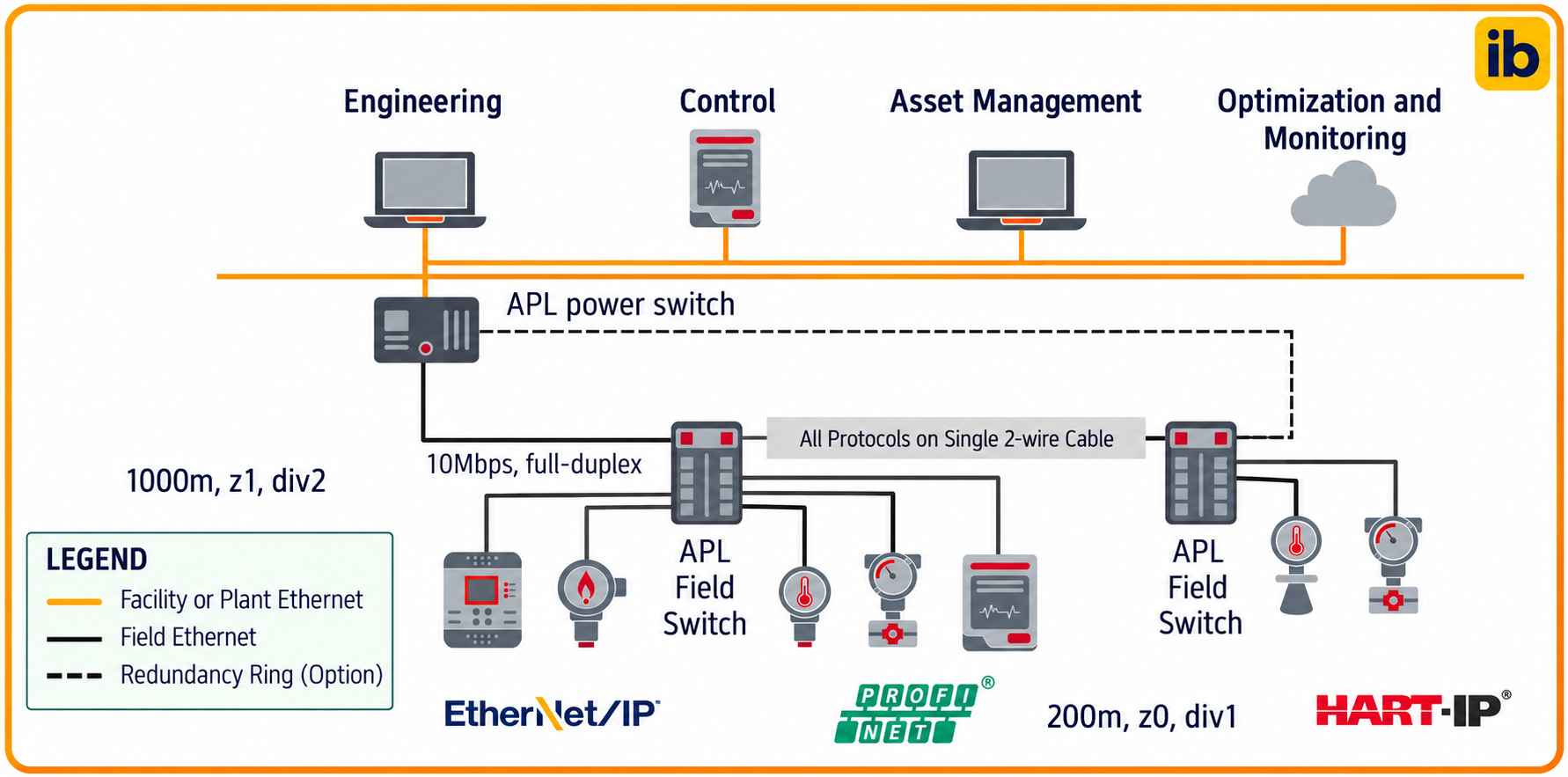
Ethernet APL is a two wire, loop powered Ethernet based on 10BASE T1L and IEEE 802.3cg. Control Engineering lists a data rate of 10 Mbit/s full duplex, trunks up to 1000 m between switches and spurs up to 200 m to each field device.
APL is also designed for hazardous areas, including Zone 0 and Zone 1, using intrinsic safety concepts that you can compare in explosion proof vs intrinsically safe instruments. Several protocols can run on APL, but HART over IP lets technicians keep the HART tools and skills they already have.
The Ethernet APL specifications were formally released in June 2021, and they follow the NAMUR recommendations NE 74 and NE 168. The protocol was ready for APL from the start because it already used standard IP networking.
Built In Security of Ethernet HART
Revision 7.7 of the HART specification, released in 2020, made minimum security suites mandatory for Ethernet HART devices. FieldComm Group lists TLS and DTLS encryption, audit logs that summarise each session, syslog messages and network time through NTP or PTP.
The FieldComm Group security technical paper recommends TLS and DTLS versions 1.2 and 1.3 with AES 128 encryption and SHA 2 hashing. Sessions start with a pre shared key or a Secure Remote Password exchange.
Each server keeps a circular audit log of the last 128 sessions, with client addresses, connect and disconnect times and configuration change counters. Accurate timestamps depend on the plant clock, so align devices with your SCADA time synchronisation using NTP or PTP.
Change the factory default key during the very first session, because the security paper says a device refuses later sessions if no new key or password is written. A factory reset is then the only way back.
Place these servers in the correct zone of your Purdue model and only allow port 5094 through the conduits that really need it. The zone and conduit approach is covered in IEC 62443 zones and conduits.
6 Practical Steps to Set Up HART IP
Step one is easier when you already keep an OT asset inventory with firmware versions and network details. Step five should use managed network switches for SCADA and DCS so that unused ports can be disabled.
Fixing Ethernet HART Link Problems
- Ping the server IP address from the host network.
- Confirm port 5094 is open on every firewall in the path.
- Capture traffic with the hart_ip filter in Wireshark.
- Check that host and device share the same key or password.
- Verify the session limit on the server is not exhausted.
- Confirm NTP or PTP time sync so audit logs make sense.
- Compare the device revision with the host description files.
When the host sees the gateway but not individual devices, the problem is usually on the field side of the gateway, not on Ethernet. In those cases, check the loop power and resistance with a HART loop voltage budget calculator before blaming the network.
- Thousands of times faster than the 1200 bit/s loop.
- Same HART commands, tools and skills.
- Several hosts can reach one device at once.
- Built in TLS, DTLS, audit logs and syslog.
- Works on standard Ethernet, Wi Fi and Ethernet APL.
- Needs IP address planning and firewall work.
- Security keys must be provisioned and managed.
- Older host software may need upgrades.
- No analog 4 to 20 mA backup on pure APL devices.
- Network faults can affect many devices together.
Typical Plant Applications
Compared with a plain Modbus RTU or Modbus TCP link, Ethernet HART gives full access to device diagnostics and descriptions, not just a register map. When a plant must mix many protocols, an industrial protocol gateway can still translate selected values for older systems.
FieldComm Group Security Paper
Video on the Move to Ethernet HART
HART IP FAQ
HART IP is the HART protocol carried over Internet Protocol networks such as plant Ethernet. It keeps the same commands and device data model as the wired and wireless versions.
Each device or gateway gets an IP address instead of a loop polling address. Host software can then reach many instruments quickly over one network connection.
The default port is 5094, used for both UDP and TCP traffic. Over UDP, that port only carries the first session request and the server then moves the conversation to another port.
Firewalls must allow port 5094 between the host and the server. The port can be changed during provisioning if the plant policy requires a different number.
Classic HART uses frequency shift keying at 1200 bits per second on the current loop. Ethernet APL runs at 10 megabits per second, which is more than 8000 times faster.
FieldComm Group estimates that a 1 MB file needs about 2 hours and 25 minutes on the loop. The same file moves in roughly one second on an APL link.
HART specification revision 7.7 made security suites mandatory for HART IP devices. They include TLS or DTLS encryption with a pre shared key or a secure password exchange.
Servers also keep an audit log of recent sessions and send syslog messages to a monitoring server. Good network zoning and firewall rules are still needed around them.
No, existing HART transmitters can be reached through WirelessHART gateways, HART multiplexers and many remote I/O systems. These products act as HART IP servers on the plant network.
New Ethernet APL instruments add native HART IP inside the transmitter itself. Many Indian plants mix both approaches during a gradual brownfield upgrade, starting with the gateways they already own.
Ethernet APL is the two wire physical layer that brings Ethernet to field instruments, including hazardous areas. HART IP is one of the application protocols that can run on top of it.
Using HART IP on APL lets technicians keep their familiar HART tools and device descriptions. It also gives far more bandwidth for diagnostics and configuration.
Start by checking IP reachability, firewall rules for port 5094 and the security key on both ends. A packet capture with the hart_ip filter in Wireshark shows whether sessions start correctly.
If the gateway answers but field devices do not, check the field wiring and loop power. The network is often fine in such cases.
Related Articles
- HART Protocol: How It Works
- WirelessHART Questions and Answers
- Process Variables in HART Transmitters
- DCS Fieldbus Integration: HART, FF and PROFIBUS PA
- IEC 62443 Zones and Conduits
External References
- Security Technical Paper, FieldComm Group
- Ethernet APL Transition Article, Control Engineering
- Highway Addressable Remote Transducer Protocol, Wikipedia
What We Learn Today
- HART IP carries the normal HART command set over IP networks, using port 5094 on UDP and TCP, so existing host tools and device descriptions keep working.
- At 10 Mb/s, Ethernet APL moves HART data more than 8000 times faster than the 1200 bit per second frequency shift keying loop signal.
- HART revision 7.7 requires TLS or DTLS, pre shared keys or passwords, a 128 session audit log and syslog for secure plant networks.