
When a compressor trips, ten alarms can appear in the same second and hide the one that started it all. A simple latching scheme freezes the first cause so the operator knows exactly where to look.
A trip usually triggers a cascade, where low pressure causes low flow, which causes high temperature and so on. First out logic records which condition arrived first and marks the rest as subsequent.
What Is a First Out Alarm?
A first out alarm is an annunciation scheme that identifies which trip condition occurred first when several alarms activate together. It is essential on turbines, compressors, boilers and burner management systems, where one fault quickly causes many others.
ElectricalVolt explains that first out logic points to the root cause when several alarms arrive at once. Without it, operators waste time chasing symptoms.
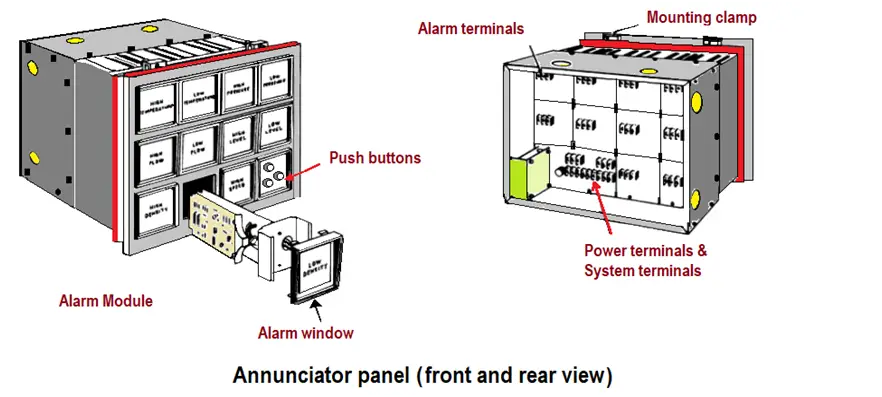
Classic hardwired annunciators showed the first alarm with a different flash rate. Modern PLCs and DCS systems do the same in software and show it on the HMI.
The display often uses a first out tag on the mimic panel or trip summary screen. The operator acknowledges it before the machine can restart.
ISA 18.1 Annunciator Sequences
| Sequence | Behaviour | Typical Use |
|---|---|---|
| A | Automatic reset when normal | General alarms |
| M | Manual reset required | Latched trips |
| R | Ringback on return to normal | Operator awareness |
| F1 to F3 first out variants | First alarm shown differently | Machine trip panels |
ISA 18.1 defines standard annunciator sequences and first out designations, with section 4.6 covering first out behaviour. ElectricalVolt notes that the most common industrial sequence matches legacy ISA sequence 1B.
Software alarm systems follow ISA 18.2, covered in alarm management ISA 18.2. First out indication is part of good trip diagnostics under that standard too.
How the PLC Logic Works
Each first out bit is a seal in rung that is enabled only while no other first out bit is set. This is simple ladder logic but must be written carefully for every input.
Place the first out routine at the very start of the program, reading inputs directly. That reduces the chance that other logic changes the order.
5 Proven First Out Alarm Steps
Time stamp the latch and store it in the historian, as described in SCADA alarm management. Trip reports then need no guesswork.
Test the logic by forcing two inputs in quick succession during commissioning. Confirm that only the first is latched.
Scan Time and Resolution
Chance of same scan ≈ 1 minus (Gap ÷ Scan time), when Gap is shorter than the scan
Example:
Scan time = 20 ms, two trips 5 ms apart
Chance both appear in one scan = 1 minus 5 ÷ 20 = 75 percent
Use SOE inputs with 1 ms resolution for fast events
If two inputs change within the same scan, the PLC cannot tell which was first. Critical machines use hardware sequence of events recording with millisecond time stamps.
Put the first out logic in a fast periodic task to shrink the uncertainty window.
Resolution Calculator
Where the chance is high, report all inputs from that scan as joint first out. Honest reporting beats a wrong single cause.
- Fast root cause diagnosis.
- Shorter restart times.
- Better trip reports.
- Fewer repeat trips.
- Scan time limits accuracy.
- Missing inputs in the list.
- Latches not reset correctly.
- Unclear HMI display.
Trips from safety instrumented functions should also feed the first out logic, even when the SIS acts independently.
ISA 18.1 Annunciator Sequences PDF
First Out Logic Explained Video
First Out Alarm FAQ
Related Articles
- Sequence of Events Recording in DCS
- Alarm Management ISA 18.2
- 7 Types of Alarms in DCS
- Burner Management System
- PLC Diagnostic Status Bits
External References
What We Learn Today
- First out alarm logic latches the first trip cause and blocks the rest.
- ISA 18.1 sequences define how annunciators show first out.
- Scan time limits resolution, so use SOE for fast events.