A SCADA tag that shows Bad or Uncertain tells you where the data path broke, as long as you can read its quality byte. Here we decode the standard OPC DA values and common OPC UA StatusCodes for fault finding on the plant.
Every value an OPC server sends carries a quality flag that says Good, Bad or Uncertain and why. Once you can decode it bit by bit, you know where to start looking for the fault.
What do opc quality codes 192, 0 and 64 mean in SCADA?
OPC quality codes are 8 bit flags sent with every OPC DA value: 192 (0xC0) means Good, 0 means Bad and 64 (0x40) means Uncertain. The top two bits give the quality, the next four give the substatus and the last two give the limit. For example, 24 means Bad with Comm Failure, so the server lost contact with the PLC.
What Are OPC Quality Codes?
OPC quality codes are status flags that an OPC server attaches to every value, telling the SCADA client whether the reading can be trusted. In OPC DA the flag is a quality word whose low byte encodes Good, Bad or Uncertain plus a reason, while OPC UA uses a 32 bit StatusCode for the same job.
- 192 (0xC0) is Good, 64 (0x40) is Uncertain and 0 (0x00) is Bad in OPC DA.
- The low byte layout is QQSSSSLL: quality, substatus and limit bits.
- OPC UA puts severity in the top 2 bits of a 32 bit StatusCode.
Every value on an OPC connection travels with a timestamp and a quality. If you have read our note on how SCADA systems work, you know a tag on the HMI depends on the whole chain behind it, and OPC quality codes are how that chain reports its own health.
OPC quality codes survived the move from DA to UA. The OPC Foundation Part 8 mapping table links Uncertain_SensorNotAccurate to the old SENSOR_CAL value and Bad_NoCommunication to COMM_FAILURE, so a migrated client can translate one into the other.
How Are OPC Quality Codes Structured Bit by Bit?
The quality byte is split into three fields: bits 7 and 6 hold the main quality, bits 5 to 2 hold the substatus and bits 1 and 0 hold the limit status. You read it as QQSSSSLL, so you can decode any value with three simple masks.
The Schneider Electric Geo SCADA knowledge base lists the masks as 0xC0 (192) for quality, 0xFC (252) for quality plus status and 0x03 (3) for the limit.
| QQ bits | Decimal base | Meaning | What the client should do |
|---|---|---|---|
| 11 | 192 (0xC0) | Good | Use the value normally |
| 01 | 64 (0x40) | Uncertain | Use with caution, flag on HMI |
| 00 | 0 (0x00) | Bad | Do not use for control or reports |
| 10 | 128 (0x80) | Not used in DA | Treat as invalid |
The limit bits tell you whether the value is pinned. 0 means not limited, 1 means low limited, 2 means high limited and 3 means constant, which a server uses when the value cannot move at all.
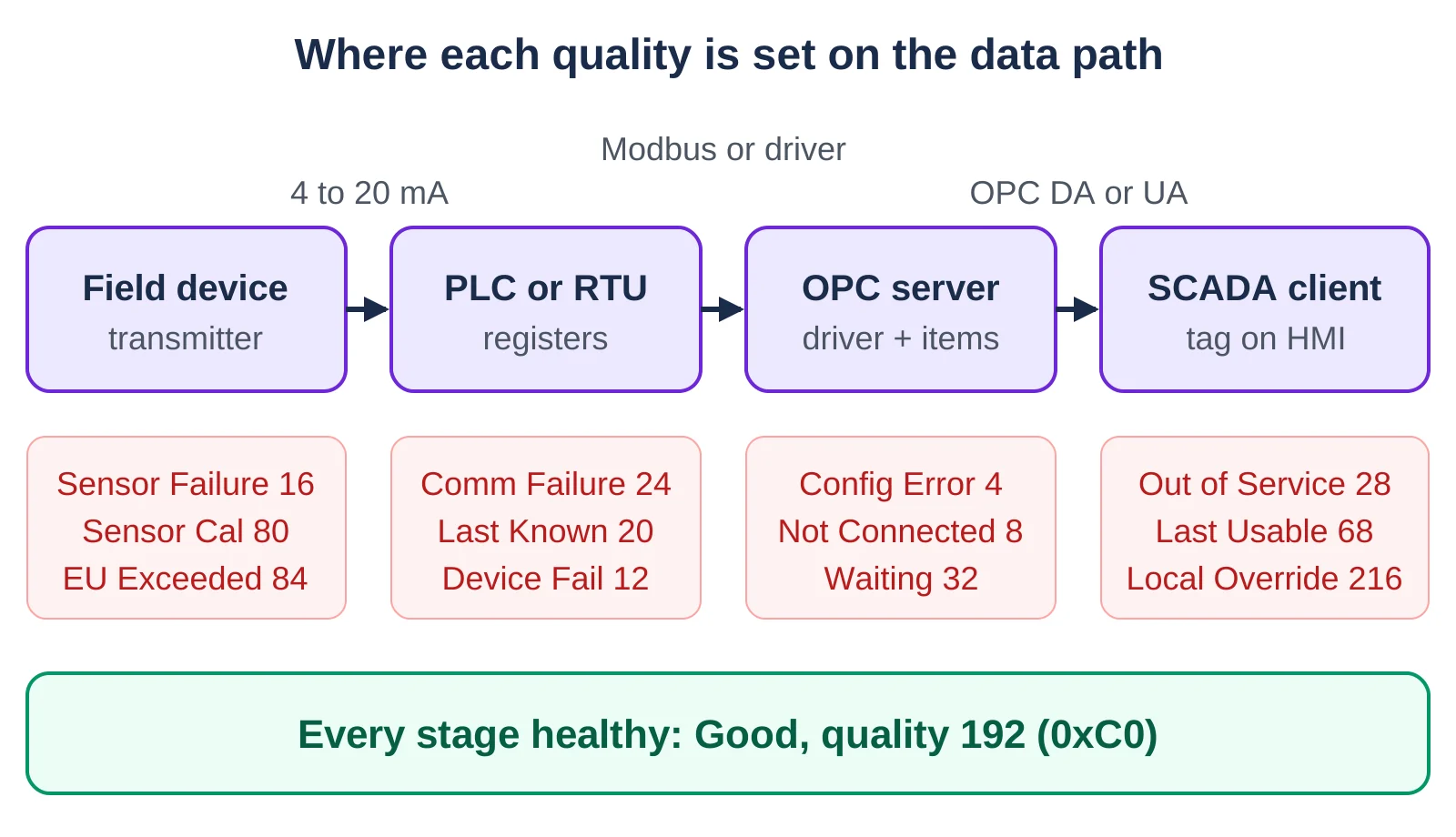
The diagram shows where OPC quality codes come from. Sensor faults start in the field, Comm Failure on the PLC link, Config Error in the server and Out of Service at the client.
When the HMI shows only a symbol, read the raw quality number in an OPC test client. Note it with the timestamp before anyone restarts the server.
OPC DA Quality Substatus Table With Decimal Values
The full value is simply the quality base plus four times the substatus number plus the limit bits. The table below lists the standard OPC quality codes with limit bits at zero, as defined in the OPC Data Access Custom Interface 3.0 and repeated in the MathWorks and Geo SCADA references.
| Value | Quality and substatus | Typical cause |
|---|---|---|
| 0 | Bad, Non Specific | Server gives no reason |
| 4 | Bad, Configuration Error | Item address wrong or deleted |
| 8 | Bad, Not Connected | Input not wired or no value yet |
| 12 | Bad, Device Failure | PLC or device reports a fault |
| 16 | Bad, Sensor Failure | Open circuit or failed sensor |
| 20 | Bad, Last Known Value | Comm lost, old value kept |
| 24 | Bad, Comm Failure | Comm lost, no value at all |
| 28 | Bad, Out of Service | Item or group inactive |
| 32 | Bad, Waiting for Initial Data | First read not done yet |
| 64 | Uncertain, Non Specific | No reason given |
| 68 | Uncertain, Last Usable Value | Source stopped updating |
| 80 | Uncertain, Sensor Not Accurate | Pegged or out of calibration |
| 84 | Uncertain, EU Exceeded | Outside engineering limits |
| 88 | Uncertain, Sub Normal | Too few good sources |
| 192 | Good, Non Specific | Healthy value |
| 216 | Good, Local Override | Value forced by a person |
For Last Known Value (20) and Last Usable Value (68), MathWorks advises checking the timestamp, because the value on screen may be hours old. Good, Local Override (216) also deserves attention, since someone has forced it by hand.
How to Decode OPC Quality Codes Step by Step
To decode a value, AND it with 192 for the quality, AND it with 60 and divide by 4 for the substatus, then AND it with 3 for the limit. Try it below on any number your SCADA shows, or follow the solved example for quality 85.
Quality: 85 AND 192 = 64 → Uncertain
Substatus: 85 AND 60 = 20
20 ÷ 4 = 5 → EU Exceeded
Limit: 85 AND 3 = 1 → Low Limited
Result: Uncertain, EU Exceeded, Low Limited
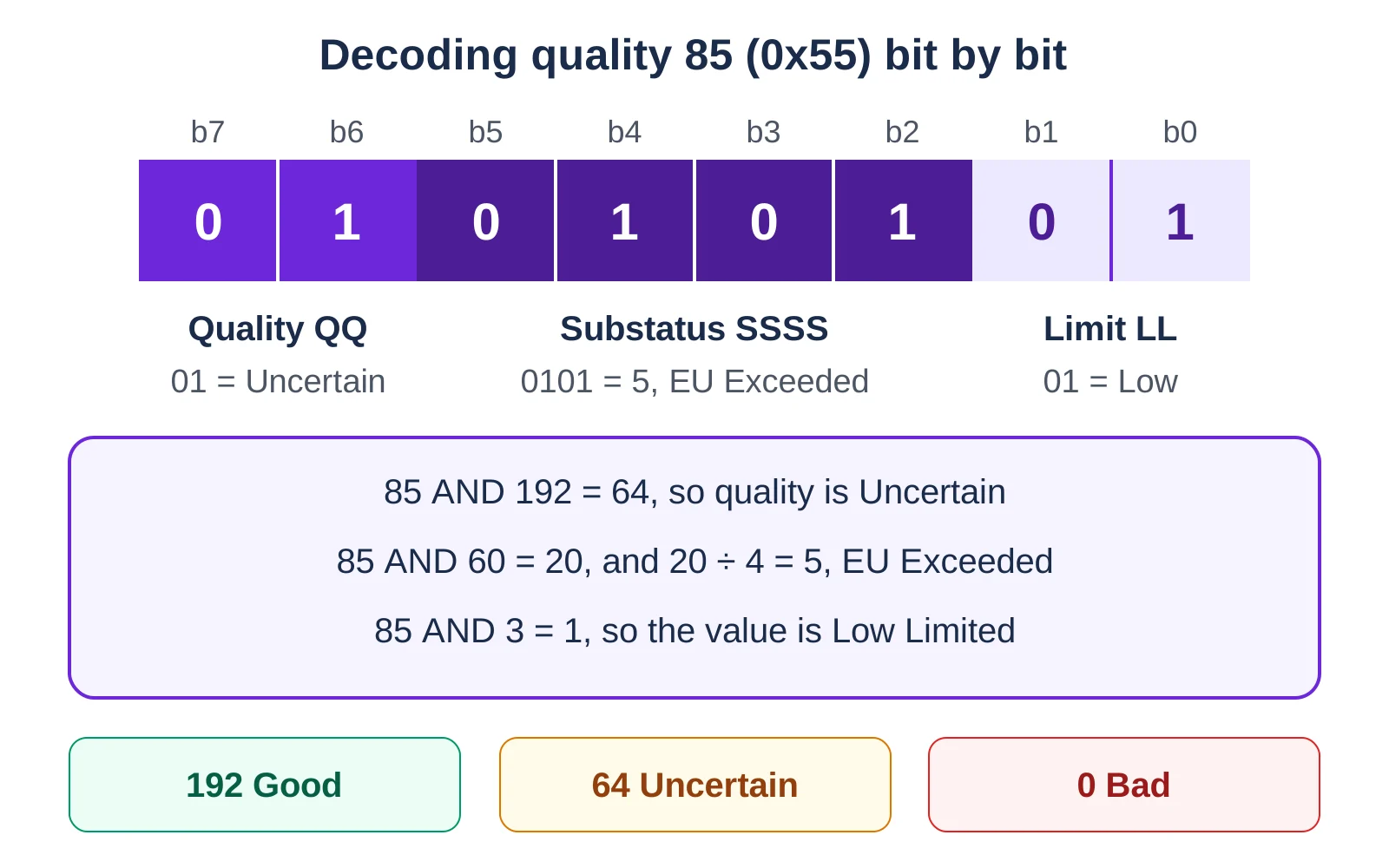
With quality 85, the server is telling you the value is below its engineering range and it doubts the reading. On a 4 to 20 mA input, check whether the transmitter sits under 4 mA with the 4 to 20 mA signal conversion calculator before you go to the field.
What Are OPC UA Status Codes?
OPC UA status codes are 32 bit numbers where the top two bits give the severity: 00 for Good, 01 for Uncertain and 10 for Bad. The low 16 bits hold info bits, including the same limit flags used in DA.
So every Bad code starts with 0x8 and every Uncertain code with 0x4 in hex. Our article on OPC UA covers sessions, certificates and the address space, which is where many UA status errors come from.
| OPC UA StatusCode | Hex | Closest DA value |
|---|---|---|
| Good | 0x00000000 | 192 Good |
| UncertainLastUsableValue | 0x40900000 | 68 Last Usable |
| UncertainEngineeringUnitsExceeded | 0x40940000 | 84 EU Exceeded |
| BadConfigurationError | 0x80890000 | 4 Config Error |
| BadNotConnected | 0x808A0000 | 8 Not Connected |
| BadSensorFailure | 0x808C0000 | 16 Sensor Failure |
| BadNoCommunication | 0x80310000 | 24 Comm Failure |
| BadOutOfService | 0x808D0000 | 28 Out of Service |
UA adds codes with no DA twin, such as BadNodeIdUnknown (0x80340000) for a missing tag path and BadUserAccessDenied (0x801F0000). BadCommunicationError (0x80050000) is a session error, not a quality on one value.
These hex values come from the open62541 status code list. If your client shows only a number like 2156527616, convert it to hex first, because that decimal value is 0x808A0000, BadNotConnected.
How to Fix Bad Quality in SCADA Tags
Start from the substatus in the OPC quality codes, since it tells you which part of the data path failed. Comm faults go to the cable and driver, config faults go to the item address, and Uncertain values go back to the instrument.
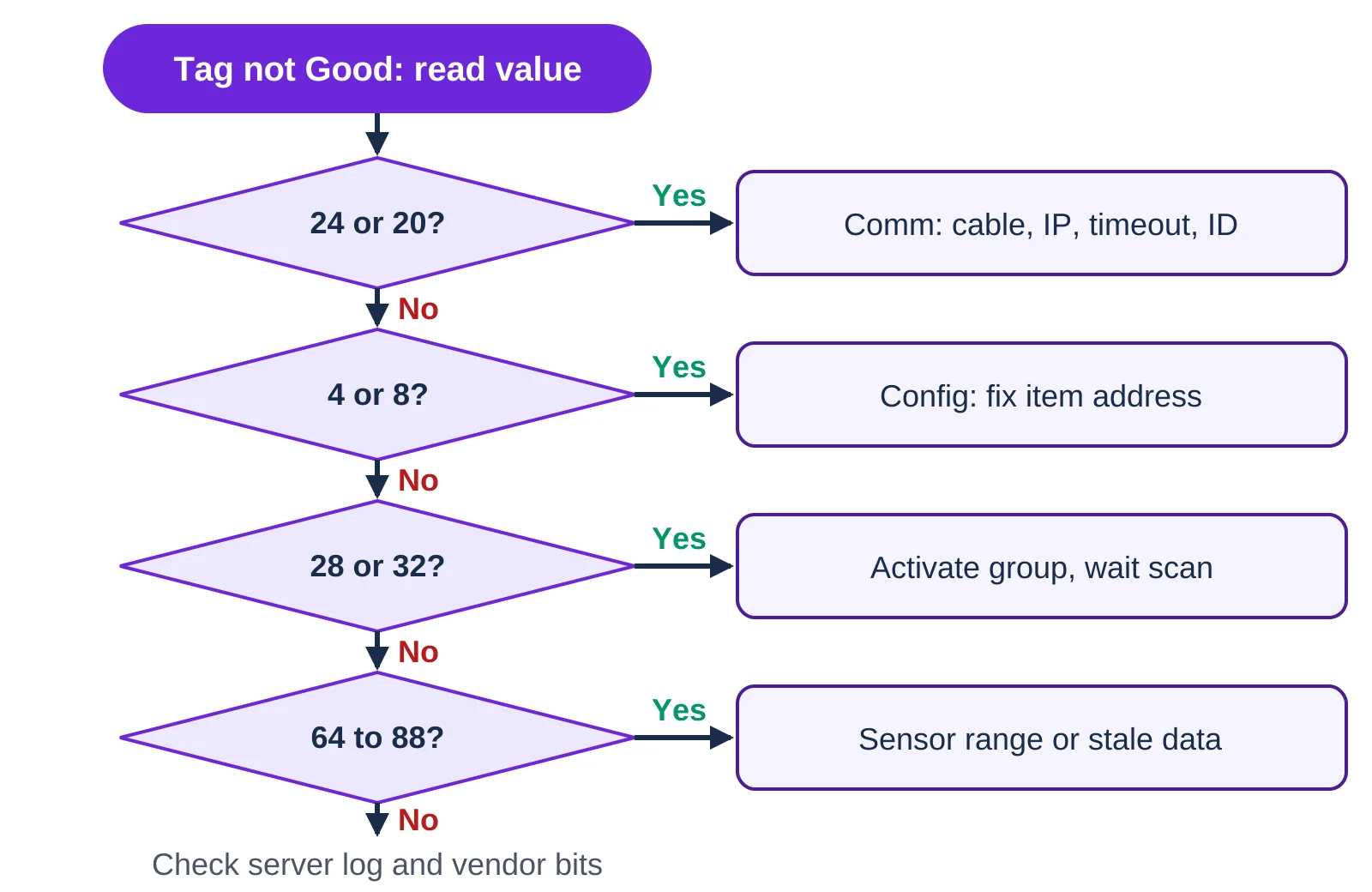
For Comm Failure on a Modbus device, check slave ID, baud rate, parity and timeout before blaming the OPC server. Our Modbus RTU troubleshooting guide walks through each of these checks, and the wider list of SCADA communication problems covers Ethernet links and radios.
For Config Error or Not Connected, compare the item address in the server with the Modbus register map or the PLC tag list. A register offset of one, a renamed PLC tag or a deleted item after an online change are the usual reasons.
If OPC quality codes flip between Good and Bad, the link may be overloaded, so review SCADA polling rate optimization and your network switches. A protocol gateway can also hold the last value and report Good after the field link dies.
- Read the raw quality number and timestamp before restarting anything.
- Decode the substatus and limit bits with the calculator above.
- Ping the device and check driver timeouts.
- Compare the item address with the register map.
- For Uncertain values, check the transmitter signal and range.
- Recheck quality after the fix and note the cause in the log.
On OPC DA systems, a client that cannot connect at all usually shows a DCOM error and not a quality value. Fix DCOM, user accounts and firewall rules first, then come back to quality codes.
Why Does OPC Quality Matter for Alarms, Historians and Control?
Quality decides whether a value can be trusted for alarms, trends and control logic, so ignoring it lets a frozen or failed signal look normal. Check OPC quality codes wherever a value is used, not only on the HMI.
In alarm handling, a Bad input should raise a bad quality or instrument fault alarm instead of a false process alarm, as discussed in our guide to SCADA alarm management. DCS engineers follow the same idea, which you can see in DCS bad PV signal quality handling.
Historians store quality with every sample, and the AVEVA PI Interface for OPC DA guide describes how OPC quality is stored as PI status. Our article on SCADA historian integration with PI explains the wider architecture.
- Show Bad and Uncertain clearly on the HMI
- Alarm on quality loss for critical tags
- Hold control output when an input goes Bad
- Store quality with every historian sample
- Using the value and ignoring quality in scripts
- Treating Uncertain the same as Good
- Gateways that hide device failure as Good
- Restarting the server before noting the code
The video shows a client connecting tags to an OPC UA server. Watch the tag status, since that is the StatusCode you decode on site.
OPC Quality Codes FAQ
Quality 192 (0xC0) means Good with no special condition, so the value can be used normally. In binary it is 11000000, with quality bits 11 and zero substatus and limit.
A value of 216 is also Good, but it means Local Override, so someone has forced the value.
OPC DA uses a 16 bit quality word with the meaning in the low byte, such as 24 for Comm Failure. OPC UA uses a 32 bit StatusCode with severity in the top two bits.
For example, DA Comm Failure maps to BadNoCommunication, 0x80310000, in UA.
AND the value with 60 and divide the result by 4 to get the substatus number. For quality 85, 85 AND 60 gives 20, and 20 divided by 4 gives 5.
Substatus 5 under Uncertain is Engineering Units Exceeded, and the limit bits 85 AND 3 give 1, Low Limited.
Quality 24 means the OPC server cannot talk to the device and has no last value. Check device power, cable, IP address, slave ID and driver timeout.
If every tag on one channel shows 24, the problem is on that link and not in the tag configuration.
The most common mistake is treating Uncertain like Good in scripts and control logic. Values such as 68 Last Usable or 84 EU Exceeded may be stale or outside range.
Flag them on the HMI, keep them out of automatic actions and check the timestamp before trusting them.
Bad 4 Configuration Error and Bad 8 Not Connected usually point to configuration. The item address may be wrong, deleted or not linked to an input.
Bad 28 Out of Service is also a setup issue, because the client group or scan class is inactive.
Related Articles
- OPC UA Explained
- SCADA Communication Problems and Fixes
- Modbus RTU Troubleshooting
- DCS Bad PV Signal Quality Handling
- SCADA Tag Database Design
External References
- AVEVA PI Interface for OPC DA User Guide (PDF)
- Schneider Electric Geo SCADA Knowledge Base: OPC Quality Flags
- Wikipedia: Open Platform Communications
What We Learn Today
- OPC quality codes pack quality, substatus and limit into one byte, so 192 is Good, 64 is Uncertain and 0 is Bad in OPC DA.
- You decode any value with three masks: AND 192 for quality, AND 60 then divide by 4 for substatus, and AND 3 for limit.
- Bad 24 points to communication, Bad 4 and 8 to configuration, Bad 28 to inactive groups and Uncertain values back to the field instrument.