Plain MQTT moves messages well but says nothing about topic names, payload format or whether a device is still alive. Sparkplug B adds those missing rules so that every PLC, gateway and SCADA host speaks the same industrial dialect.
MQTT became popular in plants because it is light and works through firewalls, yet every vendor used it differently. Sparkplug B fixes the topic structure, payload encoding and session state so devices and SCADA hosts work together out of the box.
What Is Sparkplug B?
Sparkplug B is an open specification that defines how industrial devices and applications should use MQTT: the topic names, the payload format and the rules for knowing whether a device is online. It sits on top of the MQTT protocol and does not replace it.
Cedalo notes that Cirrus Link started the Sparkplug specification in 2016, and the work later moved to the Eclipse Foundation. The Eclipse Sparkplug Working Group released version 3.0 to replace version 2.2 from 2019, and that version was then adopted as the international standard ISO/IEC 20237.
The letter B refers to the second payload definition, based on Google Protocol Buffers. For Indian plant engineers moving from polled Modbus RTU or Modbus TCP links to IIoT platforms, it is the most common way to publish PLC data to SCADA and cloud systems.
Why Plain MQTT Needed Extra Rules
MQTT defines how clients publish and subscribe through a broker, but topics and payloads are free text. One vendor may publish plant1/boiler/temp as JSON while another sends a binary block, so every integration needs custom mapping.
Plain MQTT also cannot tell a SCADA host whether a value is fresh or the device behind it has died. Compare this with OPC UA, which carries a rich information model, and you can see why the industry wanted a lighter common layer.
The specification adds a fixed topic namespace, a binary payload and session state built on the MQTT last will message, making data plug and play between suppliers.
MQTT itself was created in 1999 by Andy Stanford Clark of IBM and Arlen Nipper of Arcom for monitoring oil pipelines over satellite links. Arlen Nipper later co founded Cirrus Link, the company that started Sparkplug.
The Sparkplug B Topic Namespace
Opto 22 explains that every Sparkplug B topic follows the form spBv1.0/Group ID/Message Type/Edge Node ID/Device ID. The group and edge node IDs are chosen by the user and their combination must be unique, while the device ID is optional.
| Topic Element | Meaning | Plant Example |
|---|---|---|
| spBv1.0 | Fixed namespace and version | spBv1.0 |
| Group ID | Logical group of edge nodes | PuneUnit2 |
| Message Type | One of the defined verbs | DDATA |
| Edge Node ID | Gateway or controller that holds the MQTT session | BoilerPLC01 |
| Device ID | Optional device behind the edge node | DrumLevelTx |
A full topic therefore looks like spBv1.0/PuneUnit2/DDATA/BoilerPLC01/DrumLevelTx. Because the structure is fixed, a host can discover every node and device simply by subscribing to spBv1.0/#, which suits a well planned SCADA tag database.
9 Essential Sparkplug B Message Types
| Message Type | Sent By | Purpose |
|---|---|---|
| NBIRTH | Edge node | Announces the node is online and lists all its metrics |
| NDEATH | Broker, on behalf of node | Marks the node offline, registered as MQTT will |
| DBIRTH | Edge node, per device | Announces a device and its metrics |
| DDEATH | Edge node, per device | Marks a device offline |
| NDATA | Edge node | Reports changed node metrics |
| DDATA | Edge node | Reports changed device metrics |
| NCMD | Host application | Writes to node metrics, such as a rebirth request |
| DCMD | Host application | Writes to device metrics, such as a setpoint |
| STATE | Host application | Shows whether the primary host is online |
Users cannot invent new verbs, as Cedalo stresses. Birth, death and data messages flow up from the field, while commands and state flow down.
Birth and Death Certificates Explained
Opto 22 describes NDEATH and DDEATH as a formal use of the MQTT last will and testament, triggered when the keep alive timer expires. The host then marks every tag from that node as stale instead of showing the last good value as if it were live.
Each birth and death pair carries a bdSeq number so the host can match the correct death to the correct session. Data messages also carry a seq number that runs from 0 to 255 and then wraps, so a host spots lost messages and can ask for a rebirth, a feature similar in spirit to report by exception in DNP3.
Keep the MQTT keep alive short enough to match your alarm needs, often 30 to 60 seconds for process data. A very long keep alive means the host may show stale values as good for minutes after a gateway fails.
Primary Host Application and STATE
The primary host application is usually the SCADA or historian server that must receive every value. Cedalo explains that in version 3.0 it publishes a retained message on spBv1.0/STATE/host ID with a JSON payload holding an online flag and a timestamp, and registers the same topic with online set to false as its will.
Edge nodes watch this STATE topic and buffer data while the host is offline, then send it when the host returns. This is the Sparkplug B equivalent of store and forward and it protects history during server reboots or SCADA redundancy switchovers.
Opto 22 notes that Sparkplug B clients can use STATE for failover between brokers. If the primary host shows offline on one broker, clients look for another broker where it shows online.
Inside the Sparkplug B Payload
Payloads are encoded with Google Protocol Buffers, a compact binary format, and carry a timestamp, a sequence number and a list of metrics. Each metric has a name, an optional numeric alias, a datatype, a value and its own timestamp.
After the birth certificate, data messages can send the short alias instead of the full tag name, which saves many bytes per value. Datatypes cover integers, floats, Booleans, strings, date and time, and templates that behave like user defined types in a process historian.
Report by Exception Bandwidth Formula
Opto 22 cites Cirrus Link figures of an 80 to 90 percent cut in bandwidth compared with poll and response protocols. You can estimate your own case by comparing a polled link with exception reporting.
Exception data per hour = Tags × Changes per tag per hour × Bytes per change
Saving % = (Polled minus Exception) ÷ Polled × 100
Example:
500 tags, 1 s poll, 12 bytes per polled value
Polled = 500 × 3600 × 12 = 21,600,000 bytes = 21.60 MB per hour
360 changes per tag per hour, 20 bytes per change
Exception = 500 × 360 × 20 = 3,600,000 bytes = 3.60 MB per hour
Saving = (21.60 minus 3.60) ÷ 21.60 × 100 = 83.3 percent
These byte counts are illustrative, so measure real frame sizes with a broker monitor.
Sparkplug B Bandwidth Saving Calculator
Second Worked Example: Remote Pump Stations
A water board links 40 pump stations over 4G, each with 50 tags polled every 5 seconds at 12 bytes. Polling moves 2000 × 720 × 12 = 17.28 MB per hour, a heavy load for cellular SCADA links that already struggle with coverage.
If each tag changes about 30 times per hour and a change costs 20 bytes, exception traffic is 2000 × 30 × 20 = 1.2 MB per hour. That is a saving of about 93 percent, which directly lowers data plan cost.
Roles in a Sparkplug B System
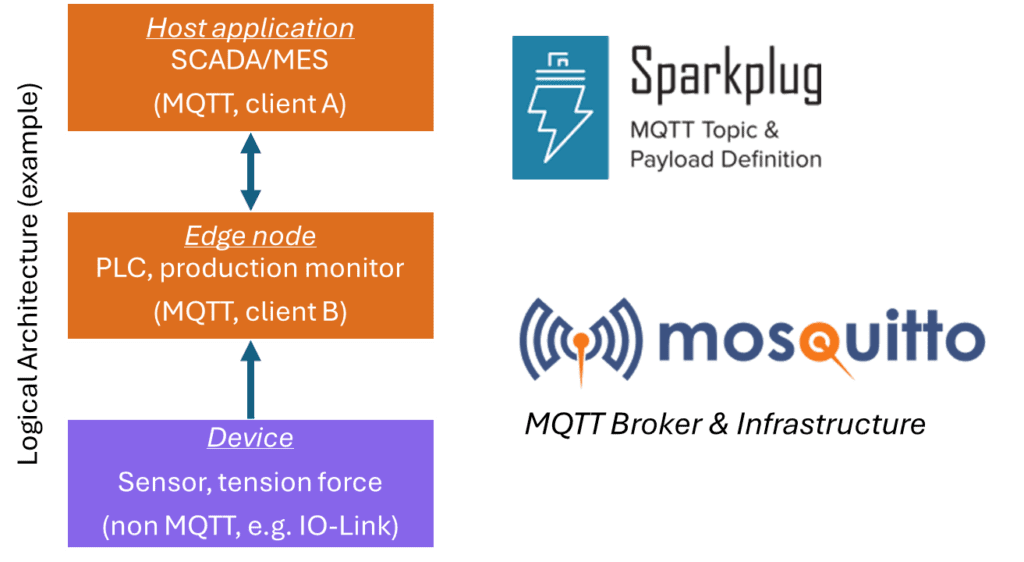
A gateway, PLC or edge controller that holds the MQTT session and publishes NBIRTH, NDATA and NDEATH.
An instrument, drive or PLC behind the edge node, described by DBIRTH and DDATA.
The broker that routes messages and delivers the will message on failure.
SCADA, historian or MES that consumes data and sends NCMD or DCMD.
Legacy instruments usually reach an edge node through an industrial protocol gateway that reads Modbus or EtherNet/IP and republishes the values. The edge node is the only part that needs to understand Sparkplug B.
Sparkplug B and the Unified Namespace
A unified namespace, or UNS, is a single broker based hub where every system publishes its current state. Sparkplug B gives that hub reliable state and typed data, a strong fit for SCADA and IIoT integration.
Its topic tree, however, is fixed as group, node and device, so it does not directly encode an ISA 95 path such as site, area, line and cell. Many architects therefore combine Sparkplug B at the edge with descriptive plain MQTT topics or a digital twin model higher up.
Commissioning Steps for an Edge Node
Every metric carries its own timestamp, so align edge clocks as described in SCADA time synchronisation before go live.
- Plug and play discovery through birth certificates.
- True state awareness with stale data marking.
- Low bandwidth from report by exception and aliases.
- Open standard with many broker and SCADA vendors.
- Binary payload needs a decoder to read.
- Fixed topic tree does not express ISA 95 hierarchy.
- Primary host logic adds commissioning steps.
- Mixed versions 2.2 and 3.0 need care with STATE.
Where Sparkplug B Is Used
Troubleshooting Sparkplug B Links
If the host shows all tags stale right after a broker restart, check that edge nodes saw the STATE online message and republished their births. A mismatch between host ID settings is the most common cause.
Use a broker client that can decode protobuf, such as the tools many broker vendors provide, when debugging. Reading raw binary payloads by eye wastes hours.
Opto 22 White Paper on MQTT and Sparkplug B
MQTT Sparkplug Introduction Video
Sparkplug B FAQ
It is an open specification that defines topic names, payload encoding and session state for industrial data sent through MQTT brokers. It was started by Cirrus Link in 2016 and is now managed by the Eclipse Foundation.
Version 3.0 replaced version 2.2 and was adopted as ISO/IEC 20237. It lets devices and SCADA hosts from different vendors exchange data without custom mapping.
Plain MQTT only moves messages and leaves topic names and payload formats to each user. The specification fixes a common namespace, a protobuf payload and nine defined message types.
It also uses the MQTT will message to create death certificates. A host can therefore tell live data from stale data, which plain MQTT cannot do by itself.
A birth certificate is published when an edge node or device comes online and lists all its metrics with current values. NBIRTH covers the node and DBIRTH covers each device.
A death certificate marks the node or device offline. NDEATH is stored at the broker as the will message and is sent automatically when the session is lost.
It is the main consumer, usually a SCADA or historian server, that must receive every value. In version 3.0 it publishes a retained STATE message that shows whether it is online.
Edge nodes wait for that online state before publishing births. While the host is offline they buffer data and send it later, so history is not lost.
Google Protocol Buffers encode data in a compact binary form that is much smaller than text. This cuts bandwidth on cellular and satellite links.
After the birth message, metrics can also be sent with short numeric aliases instead of full names. The trade off is that you need a decoder to read payloads while debugging.
Opto 22 cites Cirrus Link figures of 80 to 90 percent less bandwidth than poll and response protocols. The real saving depends on how often your tags change.
In our example, 500 tags polled every second need 21.6 MB per hour. Exception reporting at 360 changes per tag per hour needs only 3.6 MB, a saving of 83.3 percent.
It provides reliable state, typed data and automatic discovery, which are useful parts of a unified namespace. Many plants use it for edge data in their hub.
Its fixed group, node and device topics do not express a full ISA 95 hierarchy. Architects often add descriptive MQTT topics or a separate model for that layer.
Related Articles
- MQTT Protocol for Industrial IoT
- OPC UA Explained
- Report by Exception in SCADA and DNP3
- Store and Forward SCADA Historian
- Industrial Protocol Gateway
External References
- Industrial Strength MQTT and Sparkplug B White Paper, Opto 22
- MQTT Sparkplug with Mosquitto, Cedalo
- MQTT, Wikipedia
What We Learn Today
- Sparkplug B fixes the MQTT topic as spBv1.0, group ID, message type, edge node ID and an optional device ID for every message.
- Nine message types cover births, deaths, data, commands and host STATE, giving SCADA true state awareness and automatic marking of stale values.
- Report by exception and protobuf payloads cut traffic, and Opto 22 cites Cirrus Link figures of 80 to 90 percent bandwidth savings.