Any device that can reach port 502 can read or write a Modbus controller, because the protocol never asks who is talking. Protection comes from the network: zones, function code filters, monitoring and, on newer devices, TLS on port 802.
Modbus TCP was built for trusted plant networks, so it carries no password and no encryption. Attackers can abuse that, and the fixes that work are segmentation, Modbus aware firewalls, read only gateways and TLS.
What is Modbus TCP security and why does port 502 need protection?
Modbus TCP security is the set of controls that protect Modbus traffic on TCP port 502, which has no authentication, no encryption and no integrity check. Any host that reaches a PLC can send function code 6 or 16 and change a setpoint. For example, a laptop on the same switch can rewrite holding register 40001 in one packet, so you add zones, a function code whitelist, monitoring and TLS on port 802.
What Is Modbus TCP Security?
Modbus TCP security means protecting Modbus messages on TCP port 502, a protocol that trusts every client and sends every value in clear text. Because the protocol itself has no login, protection comes from the network around it and, where devices support it, from the newer secure Modbus protocol on port 802.
Modbus TCP adds only a 7 byte MBAP header in front of the old serial PDU: transaction ID, protocol ID, length and unit ID. None of these fields identifies a user or carries a signature.
Is Modbus TCP Secure by Default?
No, plain Modbus TCP is not secure by default, because the server answers any well formed request from any IP address. The SANS Institute describes Modbus as insecure by design, since confidentiality and integrity were not part of the original requirements.
| Security property | Plain Modbus TCP (502) | Modbus Security (802) |
|---|---|---|
| Authentication | None, any client accepted | Mutual X.509v3 certificates |
| Encryption | None, values in clear text | TLS 1.2 or newer |
| Integrity check | None at Modbus level | TLS record protection |
| Authorisation | None | Role carried in certificate |
| Replay protection | None | Provided by TLS session |
| Device support | Almost every device | Newer PLCs and gateways only |
On older devices, every protection in the right column has to come from outside the device, and that is the core gap in modbus tcp security. That is why the function code list matters as much as the IP address when you write firewall rules.
Run a quick Wireshark capture on a mirror port and filter on tcp.port == 502. If you can read register values in the packet details, so can anyone else on that segment.
What Attacks Target Modbus TCP?
The main attacks are unauthorised writes, reconnaissance scans, replay and man in the middle changes, and simple flooding that stalls a controller. Each one works because the protocol accepts a request without asking who sent it.
Codes 5, 6, 15 and 16 force coils or change registers, so a pump can start.
Scanners sweep port 502 and read code 43 device identification to map the plant.
A captured write is resent later, or ARP spoofing changes values in transit.
Request floods fill the small PLC TCP stack so real polls time out.
Dragos reported that the FrostyGoop malware used Modbus TCP on port 502 in January 2024 against a district heating company in Ukraine. More than 600 apartment buildings lost central heating for about two days, and the malware supports codes 3, 6 and 16.
How Does Modbus TCP Security Work in a Plant Network?
Modbus TCP security works in layers: zones keep untrusted hosts away from port 502, conduits carry only the traffic you approve, and a Modbus aware firewall checks each function code. TLS on port 802 and monitoring sit on top where the devices support them.
The diagram below follows the Purdue model levels and the IEC 62443 zones and conduits approach, with one firewall at each boundary.
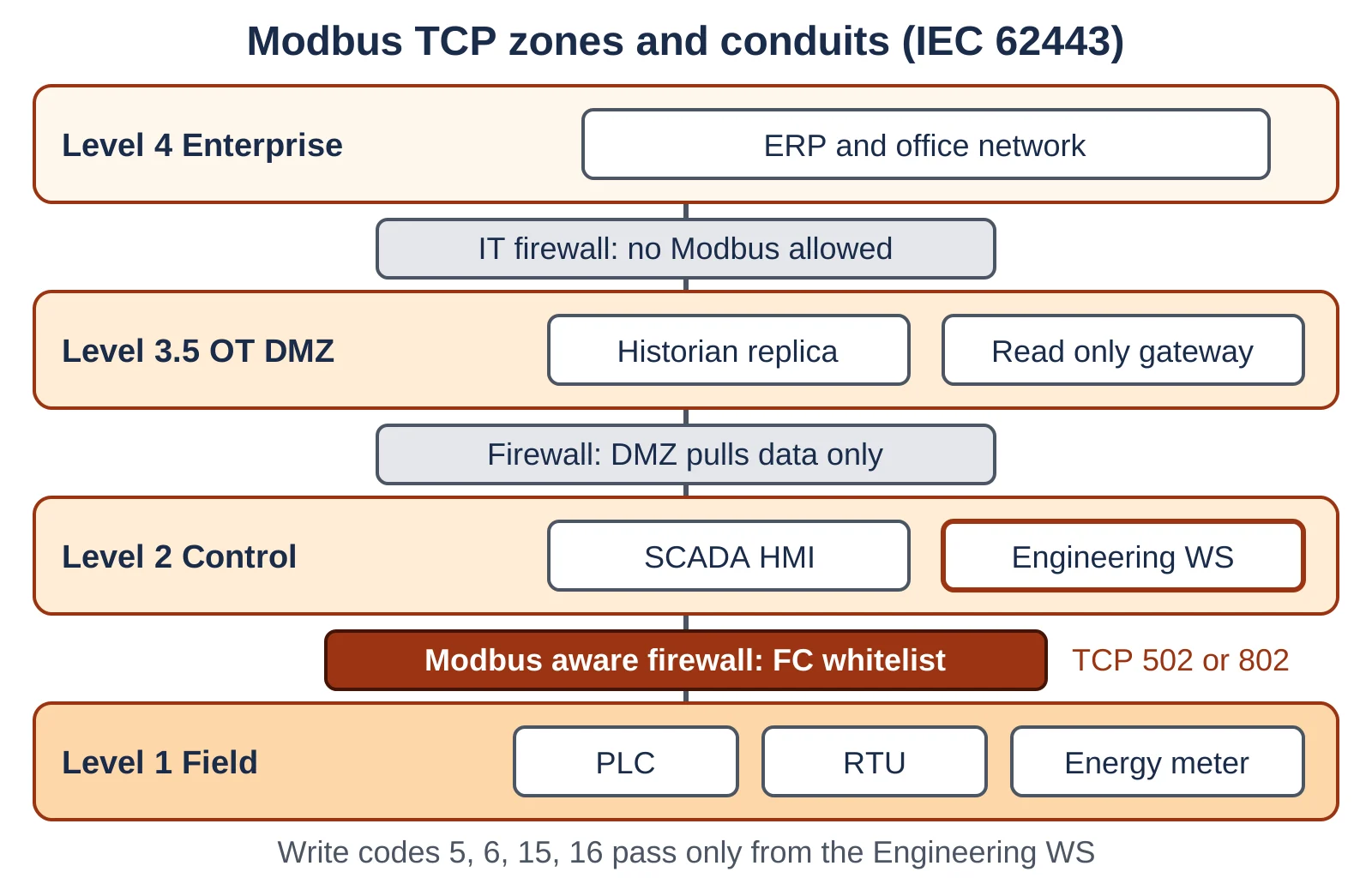
Good OT network segmentation is the base layer, and it should include managed industrial network switches with port security. On top of that, a deep packet inspection firewall reads the Modbus header and can block a write even when the IP address is allowed.
Where business users only need data, a data diode or a read only protocol gateway removes the write path altogether.
IEC 62443 3 3 defines security levels SL 1 to SL 4 for zones. A zone holding Modbus controllers that drive pumps or burners usually needs a higher target level than an office network.
What Port Does Modbus TCP Use, and What Is Port 802?
Plain Modbus TCP uses TCP port 502, while Modbus/TCP Security uses TCP port 802, which IANA assigned to the secure version. The secure version keeps the same Modbus frame and wraps it in TLS.
The Modbus Organization specification requires TLS 1.2 or better with no fallback to older versions, plus mutual client and server authentication with X.509v3 certificates.
Authorisation rides inside the certificate as a role, using the Modbus.org OID 1.3.6.1.4.1.50316.802.1. The server maps that role to allowed function codes, so an operator role can read while only an engineer role may write.
How to Secure Modbus TCP Step by Step
To secure Modbus TCP, list every device, cut the network into zones, allow only known masters, whitelist function codes, monitor writes and move to TLS where the hardware supports it. The steps below follow that order because each one makes the next easier.
An OT asset inventory is the first step, because you cannot write a whitelist for devices you do not know. Next, plan your IP addressing and subnets so each zone sits on its own range.
An OT intrusion detection system then watches for writes that slip past the rules, and PLC remote access security covers vendor sessions.
- Blocks writes from read only clients
- Works with old PLCs that cannot run TLS
- Logs every denied request for audits
- Needs no change inside the controller
- Cannot stop a hijacked engineering workstation
- Gives no encryption, so values remain readable
- Needs updates when the process changes
- Adds a device that must itself be patched
Modbus TCP Risk Score Calculator
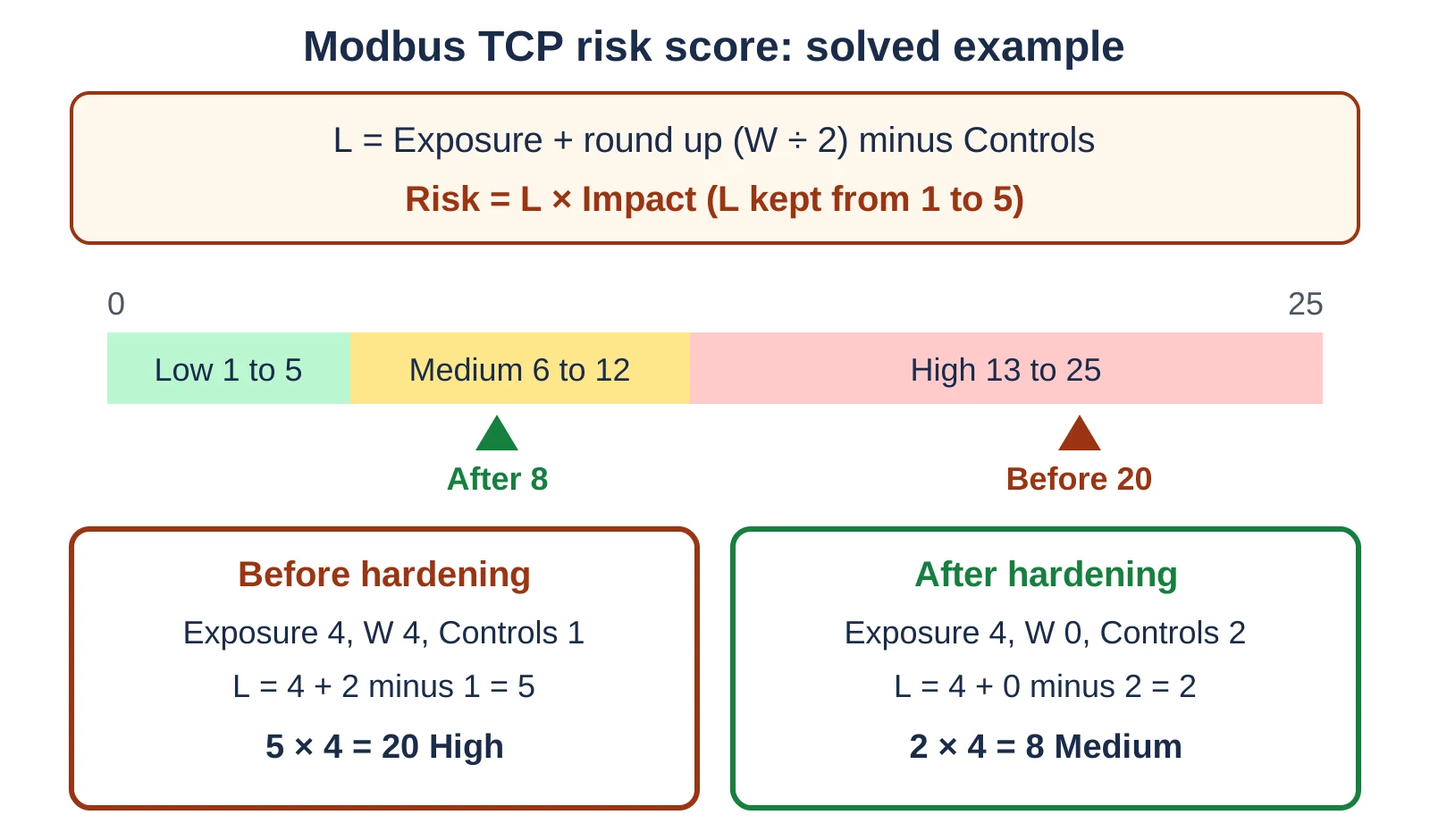
This calculator gives a quick screening score for one Modbus link by multiplying likelihood by impact on a 5 by 5 scale. It is a teaching tool, not a full IEC 62443 risk assessment.
Exposure runs from 1 (isolated cell) to 5 (reachable from the office network). W is the number of write codes (5, 6, 15, 16) reachable from untrusted hosts, and controls counts segmentation, IDS monitoring, TLS on port 802 and a read only gateway.
Before: Exposure 4, W 4, Controls 1, Impact 4
L = 4 + round up (4 ÷ 2) minus 1 = 5
Risk = 5 × 4 = 20 of 25, High
After whitelist and IDS: W 0, Controls 2
L = 4 + 0 minus 2 = 2, Risk = 2 × 4 = 8, Medium
Taking all four write codes away from untrusted hosts and adding IDS as a second control drops the score from 20 to 8.
Keep the exposure value honest. If a contractor laptop can plug into the control zone switch, treat that zone as exposure 4 even when it has no internet route.
Modbus TCP Security Troubleshooting
Most problems after hardening come from rules that are too tight, wrong unit IDs through gateways, or TLS certificate errors on port 802. These are the symptoms we usually see during commissioning, with what to check first.
| Symptom | Likely cause | What to check |
|---|---|---|
| HMI shows bad quality after firewall install | Read code or register range not allowed | Firewall deny log for code 3 or 4 |
| Setpoint write fails, reads work | Write code allowed only from EWS | Source IP of the write |
| Gateway devices time out | Unit ID not in rule | Unit ID per serial slave |
| TLS session on 802 fails | Expired or untrusted certificate | Certificate dates and CA chain |
| Write allowed but rejected by PLC | Role lacks write rights | Role mapping in the server |
When the HMI goes bad quality, check the firewall log before you touch the PLC, because the PLC is usually fine. Our Modbus RTU troubleshooting guide helps when the problem sits on the serial side of a gateway.
- Every Modbus server listed with IP, unit ID, firmware and owner
- No route from the office network to TCP port 502
- Read codes allowed only from named HMIs and historians
- Write codes 5, 6, 15 and 16 allowed only from the engineering workstation
- TLS on port 802 planned for new PLCs and gateways
For a full audit, work through our SCADA security checklist and record each gap with an owner.
Which Modbus Security Controls Should You Choose?
Choose controls by what your devices can do: old PLCs get segmentation and a Modbus aware firewall, new PLCs get TLS on port 802, and data users get a read only path. Most plants end up with a mix of all three.
| Control | Protects against | Works on old devices | Effort |
|---|---|---|---|
| Zones and conduits | Random hosts reaching 502 | Yes | Medium |
| Function code whitelist | Unauthorised writes | Yes | Medium |
| Read only gateway or diode | Any write from IT side | Yes | Low to medium |
| Modbus Security on 802 | Sniffing, spoofing, replay | No, needs support | High |
| IDS monitoring | Unnoticed new writers | Yes | Medium |
If you are building a new system, ask vendors whether the PLC supports Modbus Security on port 802 and certificate roles. The S4x18 talk below gives the background on how the Modbus Organization designed it.
Also read how zero trust for OT networks and PLC cybersecurity standards extend these ideas across the whole plant. An ICS incident response plan then tells your team what to do if a bad write gets through.
Modbus TCP Security FAQ
Plain Modbus TCP is safe enough only inside a well segmented zone with a Modbus aware firewall and monitoring. On its own it has no login, no encryption and no integrity check.
So treat port 502 as trusted only for the named masters that need it.
Modbus TCP runs on port 502 with no protection, while Modbus/TCP Security runs on port 802 inside TLS 1.2 or newer. The secure version adds mutual X.509v3 certificate checks and roles.
The Modbus frame itself stays the same in both versions.
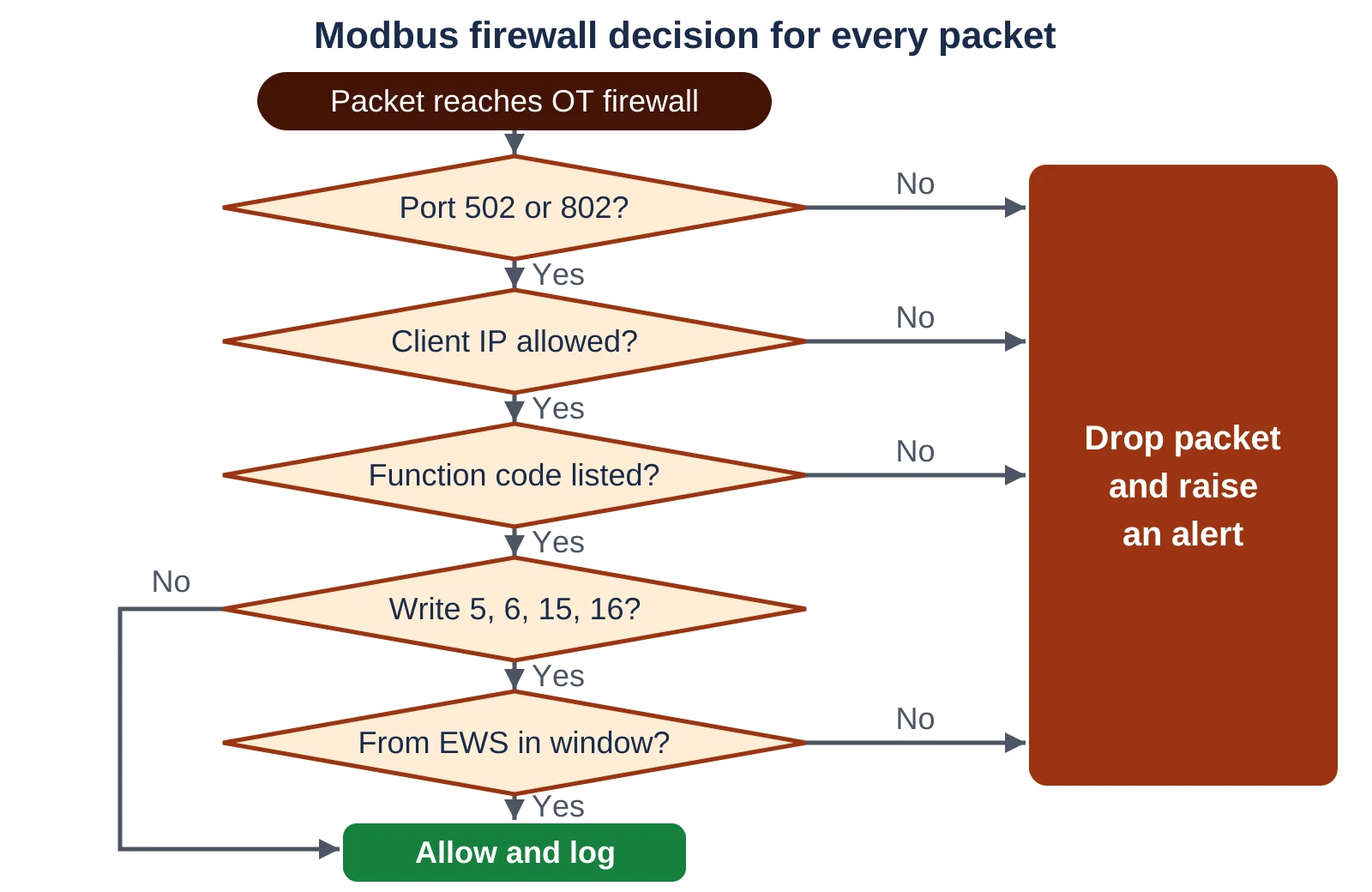
Block write codes 5, 6, 15 and 16 from every host except the engineering workstation. Also block code 8 diagnostics and code 43 device identification unless a tool really needs them.
Allow read codes 1 to 4 only from named HMIs and historians.
Add exposure and half the open write codes rounded up, subtract controls, and keep the result from 1 to 5. Multiply that likelihood by impact.
With exposure 4, four write codes, one control and impact 4, you get 5 times 4, which is 20 out of 25.
No, a VLAN only separates broadcast traffic, and every host inside it can still reach port 502. You need a firewall between VLANs that filters by IP and function code.
Add port security on switches so a stray laptop cannot join the control VLAN.
The most common mistake is switching a new firewall to blocking mode without learning normal traffic first. Weekly recipe writes or rare maintenance reads then get blocked and stop the process.
Run alert mode for one full production cycle before you enforce.
For old PLCs the best mix is a separate zone, a Modbus aware firewall with a code whitelist, and IDS monitoring. A read only gateway serves business users without any write path.
Plan TLS on port 802 at the next hardware upgrade.
Related Articles
- Modbus Function Codes Explained
- SCADA Network Security
- IEC 62443 Zones and Conduits
- Industrial Firewall Deep Packet Inspection
- OT Network Segmentation
External References
- Modbus Organization: Modbus/TCP Security Protocol Specification (PDF)
- Control.com: The TLS Protocol in Secure Modbus/TCP
- Wikipedia: Modbus
What We Learn Today
- Plain Modbus on port 502 trusts every client, so any host that reaches a PLC can write coils and registers with one request.
- Good modbus tcp security starts with an asset list, IEC 62443 zones and conduits, and a firewall that whitelists function codes per master.
- Modbus/TCP Security on port 802 adds TLS 1.2 or newer, mutual X.509v3 certificates and roles, but it needs support inside the PLC or gateway.