
A copper pad, a thin overlay and a smart controller replace mechanical buttons that wear out and let in dust and water.
A capacitive touch sensor detects the small change in capacitance when a finger comes near a conductive pad. It works through glass or plastic, with no moving parts to wear out.
What Is a Capacitive Touch Sensor?
A capacitive touch sensor is a sensing electrode, usually a copper pad on a PCB, whose capacitance increases when a finger approaches. A controller measures that change and reports a touch.
The human body acts as a conductor connected loosely to earth. Elektor notes that body capacitance is roughly 100 to 200 pF, and a fingertip adds a small but measurable extra capacitance to the pad.
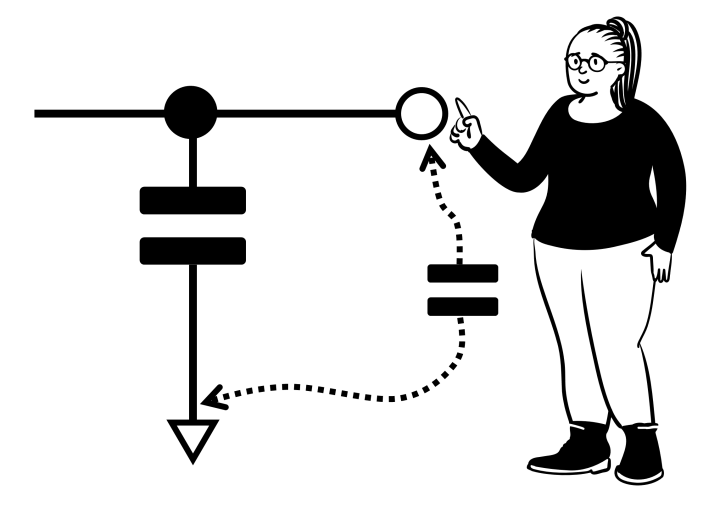
Because the finger never touches metal, the pad can sit behind glass, acrylic or plastic. That makes these sensors ideal for sealed panels and appliances.
The same principle drives industrial capacitive proximity sensors, which detect objects rather than fingers.
Self vs Mutual Capacitance
Measures capacitance between one pad and ground, which rises with a finger.
Measures coupling between transmit and receive electrodes, which falls with a finger.
Self capacitance is simpler and very sensitive, which suits single buttons and proximity wake up. It cannot easily tell apart two touches on a grid.
Mutual capacitance powers smartphone screens using diamond patterns of transparent indium tin oxide. Each crossing point is measured separately, enabling true multi touch.
How the Controller Detects a Touch
Many microcontrollers include touch peripherals, such as Microchip CTMU, which applies a constant charge and reads the voltage with the ADC. Others measure an RC charge time, much like the ideas in RC time constants.
Firmware keeps a slowly updating baseline to follow temperature and humidity changes. A touch is declared only when the reading moves quickly beyond a threshold.
Overlay Capacitance Formula
ε0 = 8.854 × 10^(minus 12) F/m
εr = overlay relative permittivity
A = finger contact area, d = overlay thickness
Worked example, acrylic overlay:
A = 1 cm² = 0.0001 m², εr = 3, d = 2 mm
C = 8.854e(minus 12) × 3 × 0.0001 ÷ 0.002
C ≈ 1.33 pF, and doubling thickness halves it
Elektor confirms that thicker overlays reduce sensitivity. Glass has a higher permittivity than plastic, so it passes touch signals better at the same thickness.
Air gaps between the pad and overlay are very harmful because air has permittivity near 1. Bond the overlay firmly with adhesive.
4 Brilliant Design Rules
Rule 3 balances noise immunity against sensitivity. Solid ground right below a pad adds too much base capacitance, a trade off also seen in ground plane design.
Rule 4 reduces pickup from switching regulators and displays. Noise and EMI are the main causes of false touches.
Touch Sensing vs Mechanical Buttons
| Feature | Capacitive Touch | Mechanical Button |
|---|---|---|
| Moving parts | None | Yes |
| Sealing | Easy behind glass | Needs gaskets |
| Wear life | Very long | Limited by contacts |
| Glove use | Poor unless tuned | Good |
| Water tolerance | Needs special firmware | Good |
| Cost | Low in volume | Low |
Touch panels look clean and are easy to wipe, which suits kitchens, medical devices and control panels. Mechanical buttons still win for thick gloves and tactile feedback.
Industrial HMI panels often combine a touch screen with a few rugged mechanical keys for critical actions.
Where Touch Sensors Are Used
Simple touch modules such as the TTP223 give a digital output and suit quick prototypes. Designs for products use microcontroller touch libraries with tuning tools.
Always test with the final enclosure and overlay. Sensitivity changes a lot between an open board and a finished product.
Overlay Capacitance Calculator
Try glass with εr around 7 to see the signal improve. Then try 4 mm thickness to see it halve.
- No moving parts to wear out.
- Works through glass and plastic.
- Easy to seal against water and dust.
- Supports sliders and gestures.
- Sensitive to noise and water.
- Needs firmware tuning.
- Thick overlays reduce sensitivity.
- Gloves can block detection.
Microchip Touch Sensor Design Guide
Touch Technology Explained Video
Capacitive Touch Sensor FAQ
Related Articles
- What Is Capacitance
- Capacitor Working Principle
- Inductive vs Capacitive Proximity Sensors
- PCB Design Fundamentals
- Ground Plane PCB Design
External References
- Touch Sensor Design Guide AN2934, Microchip
- How Touch Sensors Work, Elektor
- Getting Started With CapSense, Infineon
- Capacitive Sensing, Wikipedia
What We Learn Today
- A finger adds capacitance to a pad, and firmware compares it with a baseline.
- Self capacitance suits buttons, mutual capacitance suits touch screens.
- Thin overlays, right sized pads and careful routing give reliable touch.