
Operators expect screens to show what the plant is doing right now, yet every value has to be requested and returned over a limited link. Choosing smart poll rates and lists keeps data fresh without choking slow radio or serial channels.
A SCADA master asks each field device for data on a schedule, and that schedule decides how fresh the screens are. Tuning rates, lists and block sizes gives faster updates on the same link.

What Is SCADA Polling?
SCADA polling is the process in which a master station sends requests to PLCs or RTUs in turn and receives their data in reply, on a fixed or prioritised schedule. It is the basic data method in SCADA systems using protocols such as Modbus.
In SCADA polling the master always starts the conversation, and the field device only answers. If a device is not asked, its data does not reach the screens.
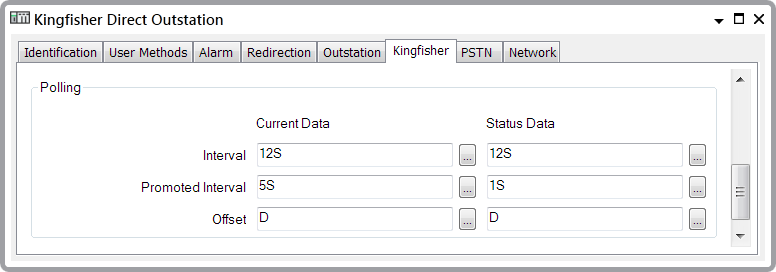
The Schneider Electric screen shows per outstation poll interval fields. Each remote can have its own rate based on importance and link speed.
Poll Rate vs PLC Scan
Joltek explains that SCADA and MES systems typically poll every 1000 ms. With a 5 ms PLC scan cycle, that is 200 logic scans between two polls.
Any event that starts and ends between two SCADA polling requests is never seen. Joltek therefore advises latching short events in the PLC until SCADA reads them.
| Setting | Typical Value | Source |
|---|---|---|
| SCADA poll rate | 1000 ms | Joltek |
| PLC scan | 5 ms | Joltek example |
| Ignition default scan class | 1 s | Joltek |
| Ignition historical scan class | 10 s | Joltek |
Polling Methods
Master reads every device in a fixed round robin.
Each read is a separate message block with its own rate.
Critical sites polled more often.
Routine sites polled less often.
Rockwell Automation describes standard and message based polling in its SCADA application guide. It also uses priority and normal poll lists so important stations are read more often.
How a Poll Cycle Runs
Protocol choice changes frame size and overhead, see SCADA communication protocols. Serial and IP versions of Modbus behave very differently, as shown in Modbus RTU vs Modbus TCP.
6 Proven SCADA Polling Tips
Register grouping starts with a clean SCADA tag database design. Frame structure is explained in Modbus protocol explained.
Event based protocols reduce SCADA polling load a lot, as compared in DNP3 vs IEC 60870 5 104.
Poll Cycle Formula
Poll cycle = Number of RTUs × Time per RTU
Example, Modbus RTU at 9600 baud:
Request 8 bytes, response 45 bytes for 20 registers, turnaround 50 ms
Time per RTU = 53 × 10 ÷ 9600 + 0.05 ≈ 0.1052 s
20 RTUs give a poll cycle of about 2.10 s
Ten bits per byte covers the start bit, 8 data bits and 1 stop bit. Parity adds one more bit, so use 11 in that case.
Poll Cycle Calculator
Retries and timeouts from a dead site can double the real SCADA polling cycle. Common causes are listed in SCADA communication problems.
- Simple and predictable timing.
- Master always knows device status.
- Works on any serial or IP link.
- Easy to troubleshoot.
- Short events can be missed.
- Slow links limit update rates.
- Unchanged data wastes bandwidth.
- Dead sites delay the whole cycle.
Where Rates Matter Most
For RTU design details, read SCADA RTU architecture. Link budgets are covered in network bandwidth and throughput.
Rockwell SCADA Application Guide
Introduction to Polling Video
SCADA Polling FAQ
Related Articles
- SCADA Communication Protocols
- SCADA RTU Architecture
- Modbus RTU vs Modbus TCP
- SCADA Communication Problems
- SCADA Tag Database Design
External References
- SCADA System Application Guide, Rockwell Automation
- PLC Scan Cycles and Polling in SCADA Systems, Joltek
- Polling in Computer Science, Wikipedia
What We Learn Today
- SCADA polling reads each field device in turn on a schedule.
- Poll rates are far slower than PLC scans, so latch short events.
- Grouping, priorities and timeouts shorten the poll cycle.