

Table of Contents
ToggleHow to Select Right PLC for Your Application
Selecting a PLC is one of the most important decisions in any automation project.
A PLC is not just a device mounted inside a panel. It is the brain of the entire system. If the brain is selected incorrectly, the machine may work, but it will never work efficiently.
Many engineers select PLCs based only on brand familiarity or price. That approach works sometimes, but it is not professional engineering practice.
Correct PLC selection requires a structured approach. Let us understand it step by step.
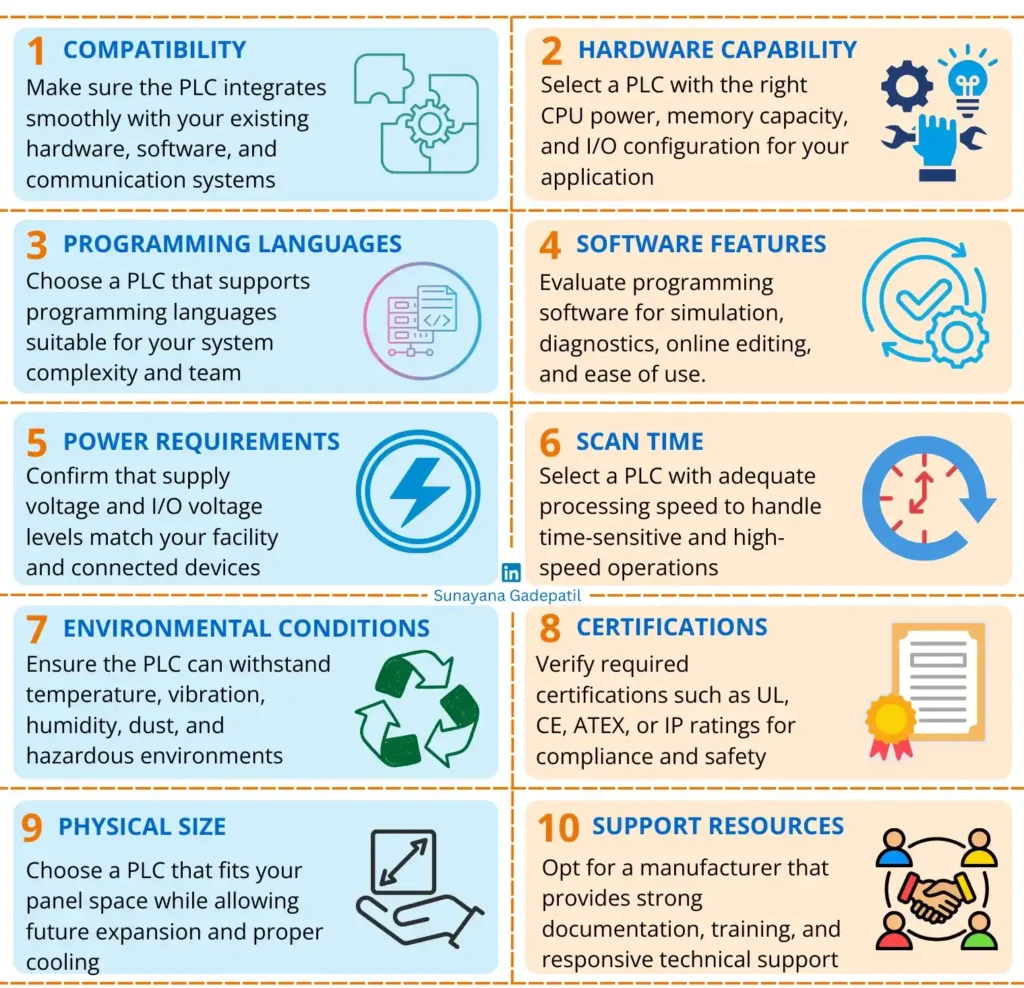
1. Compatibility with Existing Systems
Before selecting a PLC, the first thing you must check is compatibility.
A PLC never works alone. It must communicate properly with existing equipment inside the plant.
You should confirm:
Hardware compatibility – Can it integrate with your existing I/O modules, panels, and field devices?
Software compatibility – Can it work smoothly with your current programming and monitoring tools?
Communication compatibility – Does it support the same protocols used by your HMI, VFDs, SCADA, or other PLCs?
If communication fails, the entire system becomes unstable.
It is also important to think beyond today’s requirement. Technology changes quickly. Select a PLC that allows expansion and future upgrades without replacing the entire system.
A scalable PLC saves money and avoids redesign in the future.
2. Hardware Features and System Capacity
Once compatibility is confirmed, the next step is checking hardware capability.
The PLC hardware must match your process complexity, speed requirement, and future expansion plans.
Focus on the following:
CPU Performance – The CPU executes control logic and manages system operations. For simple machines, a basic processor is enough. For high-speed control, multiple PID loops, or heavy communication, a higher-performance CPU is necessary. CPU capability directly affects scan time and system responsiveness.
Memory Capacity – PLC memory stores both program and process data. Larger systems with complex logic or data logging require higher memory. Always choose memory based on application size and possible future expansion.
Communication Interfaces – Check available ports such as Ethernet, serial communication, and USB. The PLC must support required networking with HMI, SCADA, drives, or other controllers. Insufficient communication capability can limit system integration.
I/O Types and Quantity – Evaluate both number and type of I/O required. This typically includes:
Digital I/O for ON/OFF devices
Analog I/O for continuous signals
High-speed inputs for encoder signals
Pulse or PWM outputs for motion control
Selecting the correct I/O mix ensures accurate control.
Expandable or Fixed Design – Expandable PLCs allow adding modules for future growth. Fixed PLCs combine CPU and I/O in one unit and are suitable for small, stable systems.
Correct hardware selection ensures the PLC performs efficiently today and remains adaptable tomorrow.
3. PLC Programming Languages
Most modern PLCs support multiple programming languages. If you select right languages, then it improves development speed, troubleshooting, and long-term maintenance.
Understanding when to use each language is important.
Ladder Diagram (LD) – This is the most commonly used PLC language. It resembles electrical relay logic and is easy for electricians and maintenance teams to understand. Ladder is ideal for simple ON/OFF control and binary decision-based systems.
Instruction List (IL) – This is a low-level text-based language similar to assembly programming. It is compact and efficient but less intuitive. It is rarely used today and generally suited for memory-limited or legacy systems.
Function Block Diagram (FBD) – This graphical language uses functional blocks connected by lines. It is well suited for process control, timers, counters, and mathematical operations. Engineers with process background often prefer FBD.
Structured Text (ST) – This is a high-level textual language similar to Pascal or C. It is powerful for complex calculations, algorithms, data handling, and advanced logic. It is best for sophisticated automation tasks.
Sequential Function Chart (SFC) – This language represents control sequences in a step-by-step flow format. It is useful for batch processing and systems where operation sequence is critical.
Although all languages can achieve similar results, the right choice depends on application complexity and the skill level of the maintenance team.
Selecting a suitable programming language reduces development time and improves long-term scalability.
4. PLC Software Features
Selecting the right PLC is not only about hardware. The programming software plays an equally important role in productivity, troubleshooting, and long-term maintenance.
Good software can reduce downtime, simplify development, and improve system reliability.
You should evaluate the following features carefully:
Online Editing – This allows modification of the program while the PLC is running. It helps in making real-time adjustments without stopping production. However, it must be used carefully to avoid unexpected operational changes.
Simulation Mode – Simulation allows testing of control logic without connecting physical hardware. It is extremely useful for program validation, training, and error detection before commissioning.
Automatic Device Detection – Some PLC software can automatically detect connected modules and devices. This simplifies configuration and reduces setup time, especially in larger systems.
Find and Replace Function – In large programs, this feature saves time by quickly modifying repeated variables or logic elements, reducing manual editing errors.
Cross Referencing – This helps track where variables are used within the program. It is very useful during debugging and troubleshooting complex logic.
Custom Function Block Libraries – Reusable function blocks improve programming efficiency and ensure consistency across multiple projects.
Diagnostic Tools – Real-time monitoring, error codes, and communication diagnostics help identify hardware or software issues quickly. Strong diagnostic capability improves system reliability.
Documentation and User Experience – Clear help files, structured guides, and an intuitive interface reduce learning time and improve maintenance efficiency.
PLC software quality directly affects engineering efficiency, troubleshooting speed, and long-term maintainability.
Choosing user-friendly and feature-rich software is just as important as selecting the right hardware.
5. Power Supply and Voltage Compatibility
Power selection is often overlooked during PLC selection, but it directly affects reliability and compatibility.
You must check both the PLC supply voltage and the I/O voltage levels before finalizing the system.
Supply Voltage – PLCs operate on specific input power levels. The most common is 24V DC, widely used in industrial environments because it is safe, stable, and reliable. Some PLCs operate on 120V AC, which may reduce the need for separate power supplies in larger control panels. Always ensure the PLC supply voltage matches your facility power system.
I/O Voltage Levels – The PLC input and output voltage must match connected field devices. Digital I/O commonly operates at 24V DC in industrial applications because it offers better noise immunity and robustness. Lower DC levels such as 5V or 12V may be used in special systems. AC I/O modules operating at 120V AC are sometimes used for higher power loads such as motors or heaters.
Incorrect voltage selection can cause communication issues, equipment damage, or unreliable performance.
Proper power planning ensures stable operation and protects both the PLC and connected devices.
6. PLC Scan Time and Processing Speed
Scan time is a critical factor when selecting a PLC, especially for high-speed or time-sensitive applications.
Scan time refers to the time required for the PLC to complete one full cycle of operation. This cycle includes:
Reading inputs
Executing the control program
Updating outputs
This process repeats continuously and is usually measured in milliseconds.
A shorter scan time means the PLC reacts faster to input changes. This is important in applications such as high-speed manufacturing, motion control, and precision automation.
Several factors can increase scan time:
Program Complexity – Large programs with complex logic, multiple calculations, and nested conditions require more processing time.
I/O Processing – Higher I/O count increases scan time. Analog signals generally take more processing time than digital signals due to signal conversion and scaling.
Data Logging and Communication – Storing data, generating reports, or communicating with multiple devices adds processing load.
Special Functions – PID loops, motion control, and high-speed counters require additional processing capacity.
Processor Capability – Faster processors reduce scan time and improve system responsiveness.
To optimize performance, balance program complexity with CPU capability. Avoid unnecessary logic, select proper hardware, and ensure the PLC processor matches the speed requirement of your application.
Choosing the right PLC based on scan time ensures responsive and stable system performance.
7. Environmental Conditions and Installation Area
Environmental conditions directly affect the reliability and lifespan of a PLC. Before selecting any model, you must carefully evaluate the installation environment.
Consider the following factors:
Operating Temperature – Every PLC is designed to work within a specific temperature range. Excessive heat can damage electronic components, while very low temperatures can affect startup performance and reliability. In high-temperature areas, select PLCs with proper cooling provisions. In cold environments, choose models rated for low-temperature operation.
Vibration – Continuous vibration from heavy machinery can loosen wiring connections and reduce component life. In such applications, select PLCs designed with rugged construction and secure mounting support.
Humidity – High humidity may cause condensation and corrosion in electronic circuits. Proper panel sealing and moisture protection are essential in humid environments.
Dust and Corrosive Atmosphere – Dust and chemical exposure can damage sensitive components. PLCs installed in such environments must be housed in appropriately rated enclosures with suitable ingress protection.
Electromagnetic Interference – Areas with heavy electrical equipment can generate EMI, which may disturb PLC operation. Proper grounding and shielding help maintain stable performance.
Hazardous or Explosive Areas – In environments containing flammable gases or dust, only PLC systems certified for hazardous locations should be used.
Careful evaluation of environmental conditions reduces maintenance issues and significantly increases system reliability.
8. Certifications and Compliance Requirements
Certifications are important indicators of safety, quality, and regulatory compliance. Before selecting a PLC, you must verify whether it meets the required standards for your region and application.
Different certifications confirm that the PLC is suitable for specific environments and operating conditions.
UL Certification – Issued by Underwriters Laboratories, this certification confirms that the PLC meets safety standards related to fire and electrical protection, mainly for the North American market.
Class I Division 2 – This rating is required for equipment installed in hazardous locations where flammable gases or vapors may be present under abnormal conditions.
NEMA Rating – NEMA defines enclosure protection levels. A PLC installed in industrial areas must be housed in an enclosure rated for protection against dust, water, and corrosion.
CE Marking – Required for products sold in the European Union, CE certification confirms compliance with health, safety, and environmental regulations.
IP Rating – Ingress Protection ratings indicate resistance against solid particles and liquids. Higher IP numbers provide better protection for harsh industrial environments.
RoHS Compliance – This ensures that the PLC does not contain hazardous substances such as lead or mercury and meets environmental safety standards.
ATEX Certification – Required for equipment used in explosive atmospheres within the European Union. It confirms safe operation in hazardous areas.
FCC Certification – Required in the United States, this ensures that the PLC does not generate excessive electromagnetic interference.
Selecting a PLC with the correct certifications ensures legal compliance, operational safety, and long-term reliability.
9. Physical Size and Panel Space
The physical size of a PLC is often ignored, but it plays an important role in installation and future expansion.
Before selecting a PLC, evaluate the available space inside the control panel and consider long-term growth.
Space Availability – In many industrial panels, space is limited. Compact PLCs are suitable for small cabinets or OEM machines where space optimization is critical.
Scalability and Expansion – Modular PLC systems require additional space when extra I/O or communication modules are added. Always consider future expansion while planning panel layout.
Heat Dissipation – Larger PLC systems usually allow better airflow and heat distribution. Compact PLCs installed in tight enclosures may require additional cooling arrangements, especially in high-temperature environments.
Installation and Maintenance Access – Adequate spacing simplifies wiring, troubleshooting, and maintenance. Very compact installations can make servicing difficult.
Selecting the correct PLC size ensures efficient panel design, easier maintenance, and smooth future expansion.
10. Support Resources and Long-Term Assistance
PLC selection is not complete without evaluating support resources. Even the best hardware can become a problem if proper support is unavailable.
Long-term reliability depends heavily on documentation, training, and technical assistance.
Documentation – Clear and detailed manuals are essential for installation, configuration, and troubleshooting. Good documentation helps both beginners and experienced engineers solve problems quickly and reduces dependency on external support.
Training and Learning Resources – PLC technology continues to evolve. Manufacturers that provide training materials such as tutorials, webinars, and programming examples help users improve their skills and operate systems more efficiently.
Technical Support Availability – Quick and knowledgeable technical support is critical in industrial environments where downtime directly impacts production. Multiple support channels such as phone, email, or online assistance improve problem resolution speed.
A strong support ecosystem reduces commissioning time, simplifies maintenance, and increases overall system reliability.
What we learn today?
Selecting a new PLC is not a simple purchasing decision. It is a long-term engineering choice that affects performance, reliability, and future scalability.
A proper selection requires clear understanding of application needs, compatibility with existing systems, hardware capability, programming flexibility, and software usability.
You must evaluate CPU performance, memory capacity, I/O configuration, communication requirements, environmental suitability, certifications, and vendor support before finalizing the decision.
Most importantly, think beyond current requirements. Industrial systems evolve, and your PLC should be capable of expanding with future demands.
A well-chosen PLC ensures stable operation, easier maintenance, and long-term adaptability. A poorly chosen PLC may limit growth and increase operational challenges.
Choose carefully, plan strategically, and select a PLC that supports both present performance and future expansion.


I hope you like above blog. There is no cost associated in sharing the article in your social media. Thanks for Reading !! Happy Learning