

Table of Contents
ToggleIn almost every industrial plant today, SCADA is the nerve center of operations. From showing live process values to generating alarms, trends, and reports everything depends on smooth communication between PLC and SCADA.
But you know communication is rarely perfect.
Values freeze, alarms stop coming, data updates slowly or sometimes the entire screen goes blank.
These are very common SCADA Communication Problems, and every automation engineer faces them at some point.
In this article, I will explain the Top 10 SCADA Communication Problems and Solutions in very simple words, based on real field experience.
Each problem is explained with:
1) What you see (Symptoms)
2) Why it happens (Causes)
3) How to fix it (Solutions)
4) A practical field tip
This guide will help you troubleshoot faster and with more confidence. Lets Start !
1. SCADA Is Not Updating Values from PLC
This is the most common of all SCADA Communication Problems.
Symptoms:
- PLC values are changing
- SCADA screen is frozen
- No real-time update on HMI
Common Causes:
- Communication link failure
- Wrong PLC IP address
- Wrong communication driver selected
- PLC network port disabled
How to Fix:
- Ping the PLC IP from the SCADA PC
- Check Ethernet cable and switch LEDs
- Verify correct driver (Modbus, Ethernet/IP, Profibus, etc.)
- Restart the PLC communication service in SCADA
Field Tip:
Always test PLC communication using “ping” first before touching SCADA software.
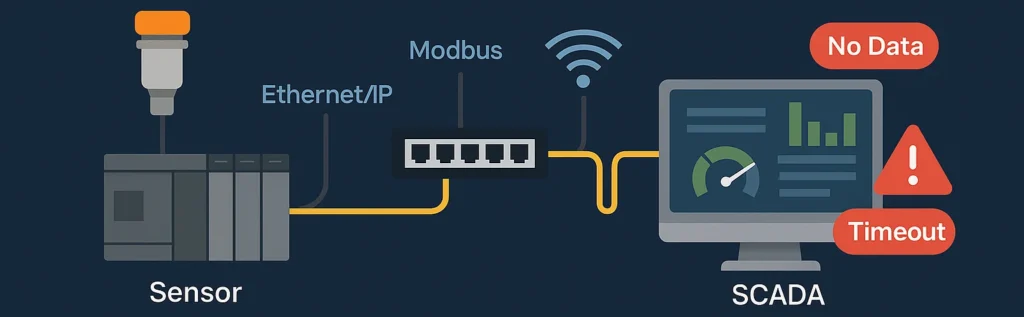
2. Intermittent SCADA Communication (Values Come and Go)
This is a dangerous SCADA Communication Problem because it creates false confidence.
Symptoms:
- Sometimes data updates, sometimes freezes
- Random communication loss alarms
- Trends show broken lines
Common Causes:
- Loose Ethernet connector
- Failing network switch
- Weak Wi-Fi signal (in wireless SCADA)
- Cable length beyond standard
How to Fix:
- Replace suspect Ethernet cables
- Avoid Wi-Fi for critical control
- Use industrial-grade network switches
- Check for CRC errors in PLC diagnostics
Field Tip:
If communication works “sometimes,” it is almost always a physical layer problem.
3. SCADA Shows Wrong Values (But PLC Is Correct)
Very confusing and very common among SCADA Communication Problems.
Symptoms:
- PLC shows 50 bar
- SCADA shows 35 bar
- Raw PLC value is correct
Common Causes:
- Wrong scaling in SCADA
- Different engineering unit ranges
- Tag linked to wrong PLC memory address
How to Fix:
- Verify PLC register mapping
- Recheck scaling formula in SCADA
- Confirm that tag address matches the PLC memory
- Compare raw value vs displayed value
Field Tip:
Always cross-check raw PLC value with SCADA tag value, not only the final engineering value.
4. SCADA Communication Timeout Errors
Timeout issues are serious SCADA Communication Problems in large networks.
Symptoms:
- “Timeout” error message
- Frequent communication alarms
- Slow screen refresh
Common Causes:
- Too many devices on one network
- High network traffic
- Large polling interval
- PLC scan time too slow
How to Fix:
- Increase SCADA timeout settings
- Optimize polling rate
- Use separate VLAN for automation
- Reduce unnecessary tag polling
Field Tip:
Never overload one PLC with thousands of tags at 100 ms update rate.
5. IP Address Conflict in SCADA Network
This is a silent killer among SCADA Communication Problems.
Symptoms:
- Communication collapses randomly
- Some PLCs go offline suddenly
- Network behaves unpredictably
Common Causes:
- Two devices using the same IP address
- Wrong DHCP configuration
- Manual IP duplication
How to Fix:
- Use IP scanner tool
- Assign fixed IP addresses
- Maintain proper IP address documentation
- Disable DHCP for SCADA networks
Field Tip:
Always keep a network IP address master list in the control room.
6. Modbus Communication Not Working in SCADA
Very common in water, utility, and energy plants.
Symptoms:
- Modbus devices show “No Response”
- Data shows zero or garbage
- CRC errors visible
Common Causes:
- Wrong slave ID
- Baud rate mismatch
- Wrong parity/stop bits
- RS-485 polarity reversed
How to Fix:
- Match all Modbus parameters exactly
- Verify A/B polarity
- Terminate RS-485 lines properly
- Test communication with Modbus test software
Field Tip:
In Modbus, even one wrong setting breaks the entire link.
7. SCADA Works in Local PC but Not on Client PCs
A software network-side SCADA Communication Problem.
Symptoms:
- SCADA runs fine on server
- Client screens show “No Data”
- Only server sees live values
Common Causes:
- LAN ports blocked by firewall
- Wrong network permissions
- OPC service not accessible remotely
How to Fix:
- Open required SCADA ports in firewall
- Check OPC server security settings
- Verify client-server licensing
- Test communication using localhost and remote IP
Field Tip:
Always involve the IT team when client communication fails but server works.
8. SCADA Data Update Is Very Slow
A performance-type SCADA Communication Problem.
Symptoms:
- Values update after 5–10 seconds
- Trend looks delayed
- Alarms come late
Common Causes:
- Heavy graphics with poor optimization
- Too many scripts running
- Low-end SCADA PC hardware
- Huge tag database loaded at once
How to Fix:
- Optimize screen graphics
- Reduce scripts and background tasks
- Upgrade RAM and SSD storage
- Use hierarchical project structure
Field Tip:
SCADA is not only about software but hardware performance matters a lot.
9. SCADA Loses Data During Power Failure
This is a critical SCADA Communication Problem in data-driven plants.
Symptoms:
- Trends missing after power return
- No historical data saved
- Alarm history wiped out
Common Causes:
- No UPS for SCADA server
- Database corruption
- No auto-backup configured
How to Fix:
- Install UPS with sufficient backup time
- Enable auto-backup of SCADA database
- Use historian server for long-term data
Field Tip:
Without UPS, SCADA is blind during power failure — always protect it.
10. SCADA Communication Fails After PLC Program Download
A classic commissioning-time SCADA Communication Problem.
Symptoms:
- SCADA was working before PLC download
- After download, all tags show bad quality
- No data updating
Common Causes:
- PLC IP changed
- Memory addresses modified
- Data block rebuilt
- Communication settings reset
How to Fix:
- Re-verify PLC IP address
- Update SCADA tag addresses
- Rebuild communication driver
- Restart PLC and SCADA services
Field Tip:
Always take a PLC communication backup before downloading a new program.
Most Common Root Causes of SCADA Communication Problems (From Field Experience)
From real-world plants, these are the most frequent root causes:
1) Poor network design
2) Wrong IP configuration
3) Too many tags polled too fast
4) Weak grounding and EMI
5) Firewall blocking ports
6) Wrong protocol settings
7) Unplanned PLC program changes
Very rarely is the SCADA software itself the actual problem.
What we learn on SCADA Communication Problems?
If you work in automation, remember this golden rule:
90% of SCADA Communication Problems and Solutions are found in networking and configuration, not in the SCADA software itself.
If you develop the habit of checking:
- Network first
- PLC second
- SCADA last
You will troubleshoot most SCADA Communication Problems quickly and logically.
Understanding these SCADA Communication Problems and Solutions will make you:
- Faster during plant breakdowns
- Stronger during commissioning
- More confident during audits
- More valuable as an automation engineer


I hope you like above blog. There is no cost associated in sharing the article in your social media. Thanks for Reading !! Happy Learning